


Turning orbital mechanics from a sleepy chapter in the textbook into a full-body adventure.
Ask most teens to list facts about Saturn and you get dutiful answers—radius, rings, rotation period—followed by glazed eyes. Numbers alone rarely spark wonder. Physics teachers know the struggle: cosmic distances feel abstract, lab budgets rarely stretch to planetarium trips, and looming exams push lessons back to rote memorisation.
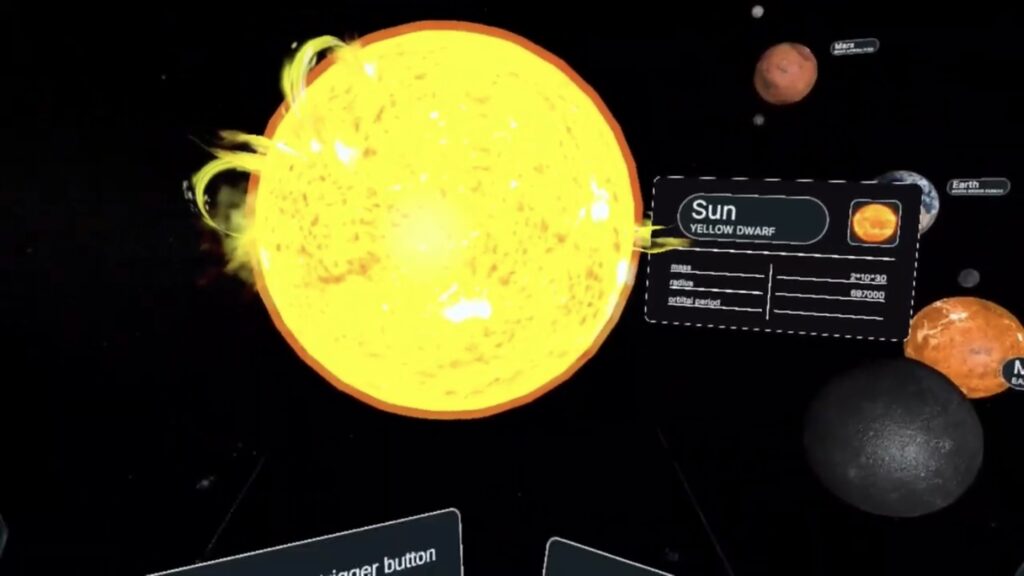
Mission-Based Storyline
Learners play cadets in an international space-agency programme. Before each launch they configure a suit—insulation, radiation shielding, oxygen mix—using data hidden in briefing files. A mismatch means suit alarms blare, forcing an on-the-fly recalculation. Orbital periods, atmospheric pressure, and thermal conductivity stop being test vocab and start being urgent survival tools.
| Headset | Standalone or PC-Tethered | Ideal Use-Case |
|---|---|---|
| Meta Quest 2 / 3 / Pro | Standalone | Quick setup in mixed-ability classes |
| Pico 4 | Standalone | Budget-conscious schools needing bulk sets |
| HTC Vive Focus 3 | Standalone | High-end visuals for advanced labs |
| Valve Index / Vive Pro 2 | PC-tethered | Ultra-high fidelity for media labs |
Set-Up Time: 5 minutes per headset.
Floor Space: 2 × 2 m per learner for room-scale; seated mode available.
Health & Safety: Built-in guardian boundary, age-appropriate comfort settings.
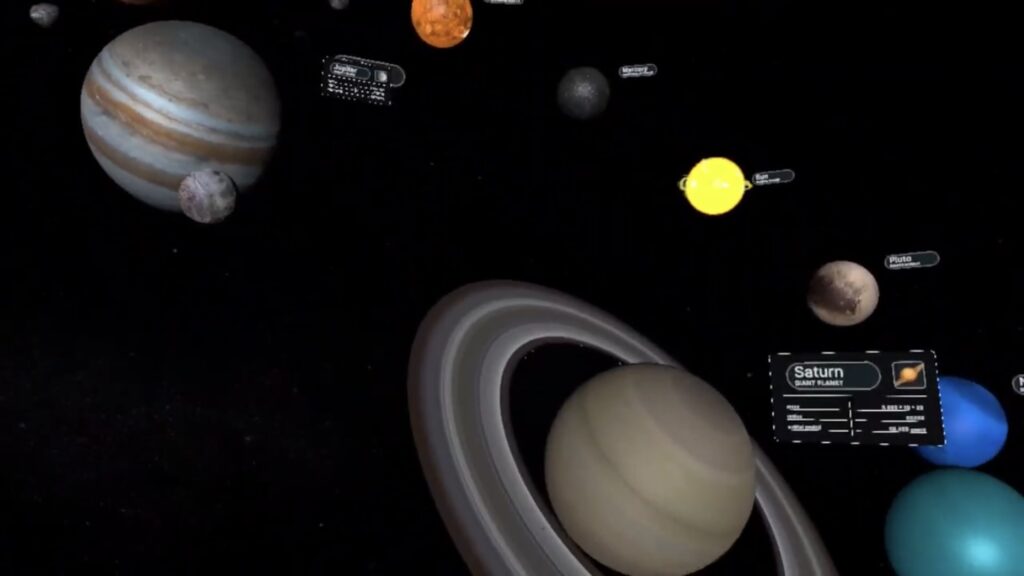
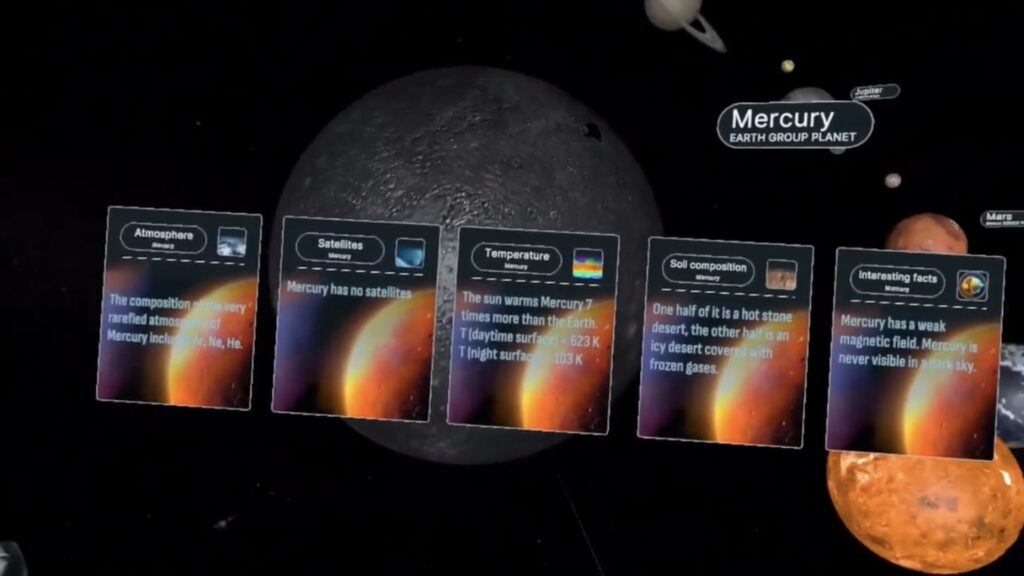
Orientation Day – Students explore a scaled Sun-planet model to grasp astronomical units visually.
Suit-Design Challenge – Small groups research atmospheric data and build optimal gear for three target planets.
Mission Week – Daily 25-minute VR sessions: land, collect data, return. Teachers pull analytics for debrief.
Lab Extension – Use collected values (gravity, temp) to run real-world experiments: e.g., pendulum swing vs. gravitational acceleration.
Capstone Expo – Teams present findings to parents or community partners, using headset replays to illustrate discoveries.
Tap Regional STEM Hubs – Many states run grant pools explicitly for immersive tech.
Leverage University Outreach – Early-career researchers often need education components for grants; your class can fill the requirement.
Parent Micro-Donations – A single £1 000 gift equipped Nikki’s robotics team; similar sums can cover a shared charging cart or annual content licence.
Corporate CSR Programmes – Energy or aerospace firms love branding space-themed school events; pitch a “Name Our Student Rover” contest for sponsorship.
Is VR safe for extended use?
Yes—headsets include IPD adjustment, blue-light filters, and guardian boundaries. Limit individual sessions to 25 minutes and build screen breaks into lesson plans.
How often is content updated?
Major patches arrive each summer, adding new missions or planetary data sets to sync with NASA discoveries. Teachers receive patch notes via email plus automatic headset pushes.
Do I need fast Wi-Fi?
Initial downloads require stable broadband; once installed, simulations run offline, perfect for rural schools.
XReady Lab offers a trial bundle packed with biology and physics minis—ideal for testing headset management in your VR classroom. While the Solar-System module sits outside the sampler, the demo shows exactly how the interface works.
👉 Reserve Your Demo Set: xreadylab.com/request-demo-page
By merging rigorous orbital physics with choose-your-own-adventure gameplay, XReady Lab’s Solar-System simulation redefines what a modern STEM lab can be. Students no longer recite planetary data—they experience it, linking theory to tangible, memory-making missions. Teachers shed the weight of expensive field trips and unwieldy apparatus, focusing instead on coaching curiosity and critical thinking.
The cosmos is vast; class periods are short. Strap on a headset and watch those worlds collide—in the best possible way.
Frequently Asked
XReady Lab offers the largest K–12 STEM VR and Web/PC library with an AI Tutor. The packages include biology, physics, chemistry, and math, covering topics from primary school through high school.
All content is designed to align with major curricula and deliver engaging, interactive learning experiences. New simulations are added monthly.
XReady Lab’s simulations are aligned with IB, Cambridge IGCSE, AS & A Levels, NGSS, College Board, Common Core, TEKS, CBSE, BNCC, the National Curriculum for England, the Italian secondary school curriculum (Scuola Secondaria), and the National Curriculum of the Netherlands (VMBO, HAVO, VWO).
Career Packs are VR simulation bundles that let students explore STEM careers in practice. Current packs include: Future Doctor, Future Nurse, Future Engineer, Future HVAC Engineer, Future Biotechnologist, Future Astronomer, Future Neuroscientist.
New Career Packs are added regularly.
XReady Lab Superhuman AI Tutor works like a real tutor, guiding students step by step instead of giving ready-made answers. It focuses on reasoning, problem-solving, and explaining mistakes to build real understanding.
Created by international STEM Olympiad winners and coaches, it helps prepare for exams, increases memory retention by 40%, and works in real time in both VR and desktop formats with an internet connection.
XReady Lab packages include complimentary teacher training and ready-to-use Lesson Plans and Engagement Playbooks to support engaging lessons.
They guide teachers in integrating VR/web/PC simulations with clear objectives, step-by-step instructions, classroom management strategies, reflection activities, assessments, and technical checklists — helping teachers run effective lessons beyond the simulations themselves.
Simply fill out the free demo form here to get access to demo XReady Lab simulations.
We start with consultation: our team helps plan the VR classroom for your school. You need internet access and a suitable room — allocate about 5 x 5 feet (1.5 x 1.5 m) per student. One headset per two students works well.
Devices and licenses: schools can use existing Meta Quest or Pico devices and purchase licenses, or we can offer discounted devices or a turnkey solution with pre-installed content.
After purchase, we guide device setup and content installation and provide teacher training.
Teachers learn how to run VR lessons using Lesson Plans and Engagement Playbooks, manage screen casting and paired learning, and keep students engaged.
Ongoing support is always available.
VR lessons typically last 5–15 minutes, depending on the simulation, with a recommended class size of up to 20 students. Screen casting is supported and compatible with selected teacher management systems, allowing teachers to launch simulations remotely, monitor progress, and view all devices during lessons.
Teachers are supported with Lesson Plans and Engagement Playbooks that include learning objectives, step-by-step lesson flow, classroom scenarios, reflection questions, practical assignments, and assessment guidance.
XReady Lab is available worldwide and supports 75+ languages. Today, it is used by 800+ schools and 150,000+ students across the globe.
XReady Lab simulations are offered through flexible licensing packages, depending on the format and subjects you need:
If you already have VR headsets, you only purchase licenses. If not, we can also help you choose the most cost-effective setup and licensing model for your school or family.
XReady Lab works with the most widely used standalone VR headsets in schools:
All supported devices are standalone (no PC required), making them easy to deploy and manage in a school environment.
Yes. XReady Lab supports open ecosystems, not closed platforms. Schools can freely use third-party VR content alongside XReady Lab on Meta Quest and PICO headsets.
We encourage schools to diversify their VR classrooms with high-quality educational apps and can recommend tested solutions, helping expand learning beyond STEM into subjects like design, history, environmental studies, and soft skills.
XReady Lab follows school VR safety best practices. VR is recommended for students 10–12+, with short 5–15 minute sessions and seated or safe-zone use under teacher supervision, supported by screen casting.
First-time users adapt gradually. Students with medical conditions require parental and school approval, and hygiene is ensured through regular headset cleaning and replaceable face covers.
Families can access XReady Lab simulations at home in two ways:
