


Question: What is an AI tutor and why do parents keep asking if it’s safe for kids?
Answer: An AI tutor is not just another homework bot. It’s a digital coach that explains tough topics step by step, adjusts to your child’s pace, and gives feedback without judgment. Parents search for it because they want something more than quick answers. A good AI tutor makes learning active, helps kids build confidence, and supports them when teachers or parents are not available. The big difference: instead of handing out polished solutions, it teaches children how to think through problems on their own.
An AI tutor is not just another chatbot. It is a system built on advanced machine learning that combines educational psychology with adaptive technology. The key difference lies in context. While older “help” tools responded with generic definitions, today’s AI tutors analyze what the student is doing, where they are struggling, and how to best guide them forward.
Imagine a child running through a math problem. Instead of spitting out the solution, the AI tutor might say: “Let’s break this down together. What do we know? What step comes first?” It functions like a patient coach, available anytime, without judgment.
For a high-quality product, context-awareness is non-negotiable. For instance, during an interactive simulation, the AI should “see” what’s on the student’s screen and adapt. If the student is halfway through a chemistry experiment, the AI should not explain biology basics. Sadly, many tools still fall short here. A true AI tutor feels like a guide inside the lesson, not an outsider reading a textbook aloud.
Parents are often unsure whether an AI tutor is really necessary. After all, schools have teachers and kids have textbooks. But the truth is, AI tutors bring something new to the table:
One parent put it well on Reddit: “I know I won’t always be able to explain algebra or physics to my kids. But I want them to have a safe way to practice until they can talk to their teacher.” This is exactly the gap AI tutors fill.
Nothing replaces the human bond of a teacher or tutor. What AI tutors do is complement that relationship. They are never tired, never impatient, and always ready to provide another explanation. For students who feel shy asking questions in class, an AI tutor becomes a safe training ground.
Think of it like a flight simulator for pilots. Real coaches still train them, but practice in a simulator makes mistakes safe and learning faster. Similarly, AI tutors let children rehearse, review, and retry until they truly understand.
Parents often ask for practical examples. Here are three widely used tools:
Math – Synthesis Tutor
Helps kids practice step-by-step problem solving with adaptive feedback.
STEM – XReady Lab’s AI Superhuman STEM Tutor
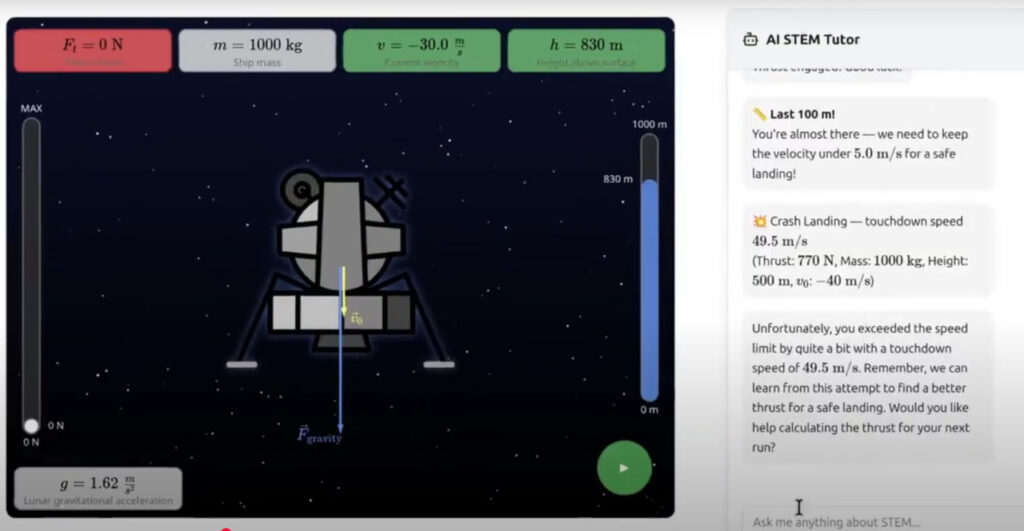
Supports students in simulations across biology, chemistry, and physics. It guides them inside a safe digital lab where they can test ideas and see instant results.
Languages – Duolingo Max
Offers AI-powered conversations that adapt to mistakes, helping learners gain real fluency.
These tools highlight the difference between passively reading and actively engaging.
AI tutors are not perfect, and parents should be aware of the challenges:
The solution is not banning AI, but guiding children in how to use it responsibly.
AI tutors are not only for kids. Teachers can use them in classrooms as assistants. Instead of spending time answering every small question, the AI handles routine practice, freeing educators to focus on deeper discussions. Teachers can also track where students get stuck, tailoring lessons more effectively.
For more insights on teacher use, see AI tutor in education.
The White House recently prioritized AI literacy through its Advancing Artificial Intelligence Education for American Youth initiative. The message is clear: AI tutors are not a passing trend but part of the future of schooling.
That means families who learn how to use these tools now are giving their children a real advantage. AI literacy is becoming as essential as reading or math.
AI tutors are not here to replace teachers or parents. They are here to extend learning, reduce stress, and build confidence. Used wisely, they transform the way children engage with math, science, and languages.
The real question is not “what is an AI tutor?” anymore. It is “when will every family and classroom use one?” Parents who explore safe, proven tools today will be better prepared for tomorrow’s education landscape.
Frequently Asked
XReady Lab offers the largest K–12 STEM VR and Web/PC library with an AI Tutor. The packages include biology, physics, chemistry, and math, covering topics from primary school through high school.
All content is designed to align with major curricula and deliver engaging, interactive learning experiences. New simulations are added monthly.
XReady Lab’s simulations are aligned with IB, Cambridge IGCSE, AS & A Levels, NGSS, College Board, Common Core, TEKS, CBSE, BNCC, the National Curriculum for England, the Italian secondary school curriculum (Scuola Secondaria), and the National Curriculum of the Netherlands (VMBO, HAVO, VWO).
Career Packs are VR simulation bundles that let students explore STEM careers in practice. Current packs include: Future Doctor, Future Nurse, Future Engineer, Future HVAC Engineer, Future Biotechnologist, Future Astronomer, Future Neuroscientist.
New Career Packs are added regularly.
XReady Lab Superhuman AI Tutor works like a real tutor, guiding students step by step instead of giving ready-made answers. It focuses on reasoning, problem-solving, and explaining mistakes to build real understanding.
Created by international STEM Olympiad winners and coaches, it helps prepare for exams, increases memory retention by 40%, and works in real time in both VR and desktop formats with an internet connection.
XReady Lab packages include complimentary teacher training and ready-to-use Lesson Plans and Engagement Playbooks to support engaging lessons.
They guide teachers in integrating VR/web/PC simulations with clear objectives, step-by-step instructions, classroom management strategies, reflection activities, assessments, and technical checklists — helping teachers run effective lessons beyond the simulations themselves.
Simply fill out the free demo form here to get access to demo XReady Lab simulations.
We start with consultation: our team helps plan the VR classroom for your school. You need internet access and a suitable room — allocate about 5 x 5 feet (1.5 x 1.5 m) per student. One headset per two students works well.
Devices and licenses: schools can use existing Meta Quest or Pico devices and purchase licenses, or we can offer discounted devices or a turnkey solution with pre-installed content.
After purchase, we guide device setup and content installation and provide teacher training.
Teachers learn how to run VR lessons using Lesson Plans and Engagement Playbooks, manage screen casting and paired learning, and keep students engaged.
Ongoing support is always available.
VR lessons typically last 5–15 minutes, depending on the simulation, with a recommended class size of up to 20 students. Screen casting is supported and compatible with selected teacher management systems, allowing teachers to launch simulations remotely, monitor progress, and view all devices during lessons.
Teachers are supported with Lesson Plans and Engagement Playbooks that include learning objectives, step-by-step lesson flow, classroom scenarios, reflection questions, practical assignments, and assessment guidance.
XReady Lab is available worldwide and supports 75+ languages. Today, it is used by 800+ schools and 150,000+ students across the globe.
XReady Lab simulations are offered through flexible licensing packages, depending on the format and subjects you need:
If you already have VR headsets, you only purchase licenses. If not, we can also help you choose the most cost-effective setup and licensing model for your school or family.
XReady Lab works with the most widely used standalone VR headsets in schools:
All supported devices are standalone (no PC required), making them easy to deploy and manage in a school environment.
Yes. XReady Lab supports open ecosystems, not closed platforms. Schools can freely use third-party VR content alongside XReady Lab on Meta Quest and PICO headsets.
We encourage schools to diversify their VR classrooms with high-quality educational apps and can recommend tested solutions, helping expand learning beyond STEM into subjects like design, history, environmental studies, and soft skills.
XReady Lab follows school VR safety best practices. VR is recommended for students 10–12+, with short 5–15 minute sessions and seated or safe-zone use under teacher supervision, supported by screen casting.
First-time users adapt gradually. Students with medical conditions require parental and school approval, and hygiene is ensured through regular headset cleaning and replaceable face covers.
Families can access XReady Lab simulations at home in two ways:
