


Question: Which VR career simulations are worth bringing into schools?
Answer: Those that combine safety, realism, and a clear link to real professions. Woodworking or roofing simulators, for example, let students explore hands-on jobs that textbooks rarely cover. For schools, this is an opportunity to make career guidance practical, engaging, and future-ready.
Career guidance in schools has often been limited to tests that suggest future jobs or career days with guest speakers. While useful, these methods rarely give students a true feel for what a profession is like. Virtual reality changes that.
VR is already used in STEM education, but its potential goes far beyond. With a headset, students can step into the shoes of a roofer, a carpenter, or even a surgeon. They are no longer passive listeners. They are active participants.
Why does this matter so much?
Exposure to professions early – Teenagers should not have to wait until college to figure out if they enjoy working with their hands, designing buildings, or repairing equipment.
Safe experimentation – Climbing a real roof or using heavy woodworking tools would be risky in real life, but VR allows students to explore safely.
Engagement – Instead of reading about a profession, students live it. This creates memories that stick and a deeper appreciation for the work involved.
Stronger school reputation – Parents notice when a school offers innovative career guidance. VR makes the school look modern, relevant, and invested in students’ futures.
In many countries, including the US and Europe, schools face pressure to show students not only academic content but also clear career pathways. VR career simulations fill this gap.
XReady Lab is known for science simulations, but schools often ask us a bigger question: How can we use VR headsets beyond physics or biology labs? The answer is career guidance. When schools purchase VR classrooms, the equipment should not sit idle outside science lessons. With the right apps, one set of headsets can cover multiple subjects and professions.
That is why we also recommend quality third-party VR products. Our role is to help schools build programs that combine STEM learning with practical career experiences.
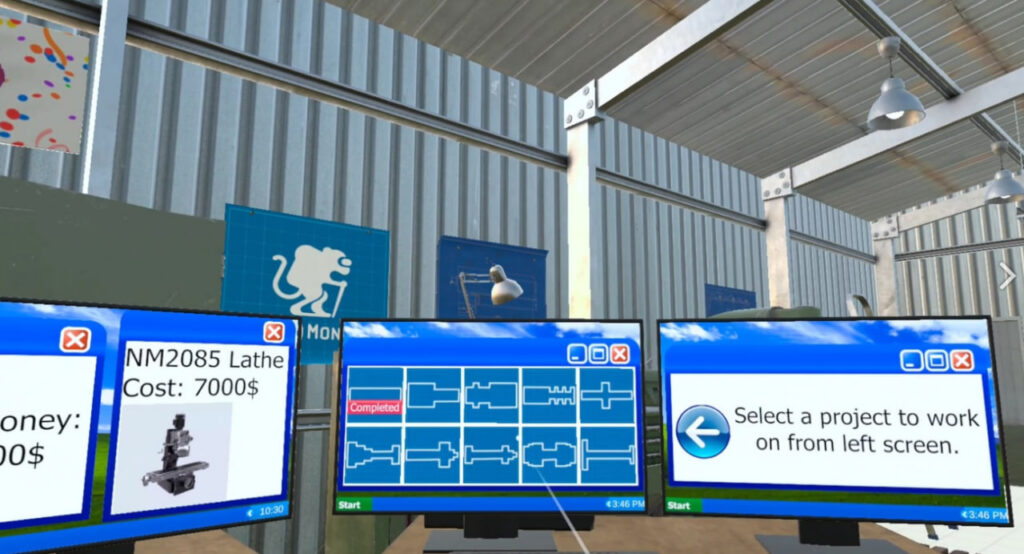
👉 Machine Shop Simulator on SideQuest
And Meta Store
This simulation takes students into a woodworking workshop where they operate a lathe across 10 levels. They feel the haptic feedback of carving and chiseling wood, experiment with shapes, and see how small changes affect the final product.
The simulator includes 10 different soundtracks to set the mood, from calm background music to energetic beats. Future updates promise CNC milling, drilling, cutting, and plating, which would expand the range of skills students can explore.
Why it works in schools:
Introduces craftsmanship and creativity.
Connects math and geometry to real tasks.
Lets students experience the patience and precision needed for trade skills.
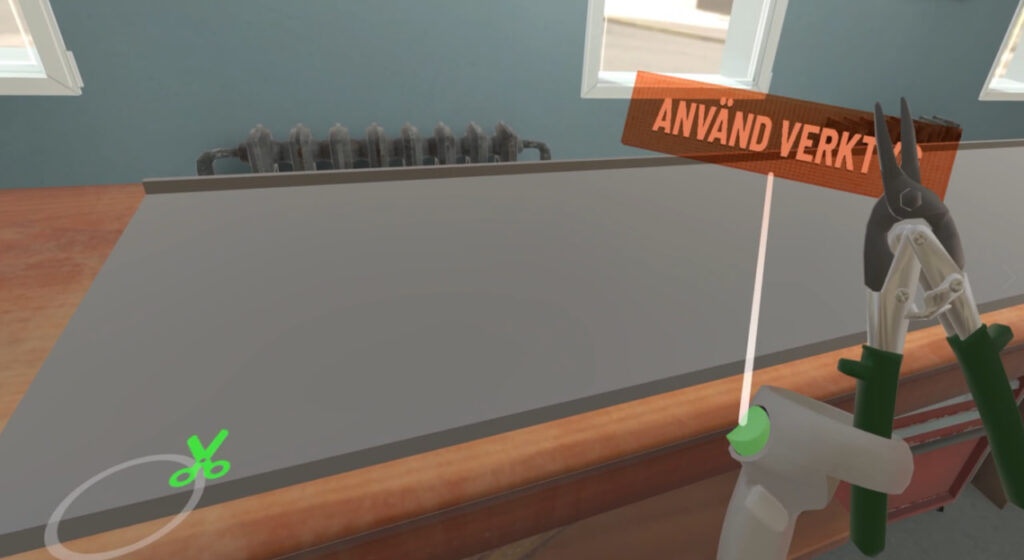
Here students step into the role of a roofer on a construction site. They handle tools, cut and shape metal sheets, and climb rooftops. They experience the physicality of the job while learning about safety and accuracy.
Why it works in schools:
Provides a realistic look at construction work.
Helps students appreciate the skill and responsibility involved.
Breaks stereotypes about “blue collar” jobs by showing their importance.
And Meta Store
Teachers often ask: how do I actually bring this into a classroom? Here is a simple plan.
Introduce the profession
Start with a short talk or presentation. Explain what roofers or carpenters do, how their work impacts daily life, and what skills they need.
Break stereotypes
Many students assume certain jobs are “less valuable.” Discuss why all professions matter. Show how carpenters and roofers play critical roles in safety, design, and infrastructure.
Optional: Invite a guest speaker
A local roofer, builder, or craftsman can speak for 10 minutes about their work. Hearing directly from a professional helps students take the VR experience more seriously.
VR immersion
Divide the class into groups. While some students use the headsets, others observe on a screen. Encourage them to take notes on what they notice about the profession.
Reflection and discussion
After the VR activity, ask questions:
What surprised you?
What skills were needed?
What did you find difficult?
Would you try this profession again?
Link back to school subjects
Machine Shop Simulator → geometry, measurement, and design.
VR Roofer → engineering, physics, and safety.
Wrap-up and connection to career choices
Emphasize that these jobs require intelligence, skill, and focus. They are not “fallback” careers but important roles in society.
Career simulations give students perspective. They show that success is not limited to doctors, lawyers, or programmers. Skilled trades offer real opportunities, and VR allows students to test them before making life decisions.
For schools, offering such programs adds depth to education. It connects theory to practice, inspires respect for all professions, and helps students see pathways that align with their interests.
Virtual reality is no longer just for science labs. With woodworking and roofing simulations, schools can make career guidance practical, safe, and exciting.
At XReady Lab, we help schools build VR programs that combine STEM education with career experiences.
Schools can contact us for advice – we will help put together a VR package that includes both STEM and other disciplines and career simulations.
Together, we can help students discover professions early, explore safely, and prepare for the future.
Frequently Asked
XReady Lab offers the largest K–12 STEM VR and Web/PC library with an AI Tutor. The packages include biology, physics, chemistry, and math, covering topics from primary school through high school.
All content is designed to align with major curricula and deliver engaging, interactive learning experiences. New simulations are added monthly.
XReady Lab’s simulations are aligned with IB, Cambridge IGCSE, AS & A Levels, NGSS, College Board, Common Core, TEKS, CBSE, BNCC, the National Curriculum for England, the Italian secondary school curriculum (Scuola Secondaria), and the National Curriculum of the Netherlands (VMBO, HAVO, VWO).
Career Packs are VR simulation bundles that let students explore STEM careers in practice. Current packs include: Future Doctor, Future Nurse, Future Engineer, Future HVAC Engineer, Future Biotechnologist, Future Astronomer, Future Neuroscientist.
New Career Packs are added regularly.
XReady Lab Superhuman AI Tutor works like a real tutor, guiding students step by step instead of giving ready-made answers. It focuses on reasoning, problem-solving, and explaining mistakes to build real understanding.
Created by international STEM Olympiad winners and coaches, it helps prepare for exams, increases memory retention by 40%, and works in real time in both VR and desktop formats with an internet connection.
XReady Lab packages include complimentary teacher training and ready-to-use Lesson Plans and Engagement Playbooks to support engaging lessons.
They guide teachers in integrating VR/web/PC simulations with clear objectives, step-by-step instructions, classroom management strategies, reflection activities, assessments, and technical checklists — helping teachers run effective lessons beyond the simulations themselves.
Simply fill out the free demo form here to get access to demo XReady Lab simulations.
We start with consultation: our team helps plan the VR classroom for your school. You need internet access and a suitable room — allocate about 5 x 5 feet (1.5 x 1.5 m) per student. One headset per two students works well.
Devices and licenses: schools can use existing Meta Quest or Pico devices and purchase licenses, or we can offer discounted devices or a turnkey solution with pre-installed content.
After purchase, we guide device setup and content installation and provide teacher training.
Teachers learn how to run VR lessons using Lesson Plans and Engagement Playbooks, manage screen casting and paired learning, and keep students engaged.
Ongoing support is always available.
VR lessons typically last 5–15 minutes, depending on the simulation, with a recommended class size of up to 20 students. Screen casting is supported and compatible with selected teacher management systems, allowing teachers to launch simulations remotely, monitor progress, and view all devices during lessons.
Teachers are supported with Lesson Plans and Engagement Playbooks that include learning objectives, step-by-step lesson flow, classroom scenarios, reflection questions, practical assignments, and assessment guidance.
XReady Lab is available worldwide and supports 75+ languages. Today, it is used by 800+ schools and 150,000+ students across the globe.
XReady Lab simulations are offered through flexible licensing packages, depending on the format and subjects you need:
If you already have VR headsets, you only purchase licenses. If not, we can also help you choose the most cost-effective setup and licensing model for your school or family.
XReady Lab works with the most widely used standalone VR headsets in schools:
All supported devices are standalone (no PC required), making them easy to deploy and manage in a school environment.
Yes. XReady Lab supports open ecosystems, not closed platforms. Schools can freely use third-party VR content alongside XReady Lab on Meta Quest and PICO headsets.
We encourage schools to diversify their VR classrooms with high-quality educational apps and can recommend tested solutions, helping expand learning beyond STEM into subjects like design, history, environmental studies, and soft skills.
XReady Lab follows school VR safety best practices. VR is recommended for students 10–12+, with short 5–15 minute sessions and seated or safe-zone use under teacher supervision, supported by screen casting.
First-time users adapt gradually. Students with medical conditions require parental and school approval, and hygiene is ensured through regular headset cleaning and replaceable face covers.
Families can access XReady Lab simulations at home in two ways:
