


Question: What can I do if my child is bored without screens?
Answer: You don’t need to panic. Kids don’t actually need phones or tablets to stay engaged. What they really need is a mix of hands-on activities, small challenges, and opportunities to create. Parents on Reddit and educators alike confirm: screen-free time is not only possible, it can become the most rewarding part of the day.
Let’s be honest. Devices are convenient. They keep kids quiet, they provide instant fun, and they buy parents some much-needed breathing room. But too much screen time brings its own problems: sleep struggles, short attention spans, and constant “I’m bored” complaints when the device is taken away.
That is why screen-free activities matter. They help kids build patience, creativity, and independence – skills that no app can replace. And the good news? You don’t need expensive equipment to make it work.
One of the smartest tricks parents recommend is creating individual activity boxes. Each box is filled with small, screen-free activities that match the child’s age. You bring it out during moments when you need them focused, like before lunch or while cooking.
For toddlers (age 3-4): board books, chunky puzzles, playdough, lacing shapes, stacking cups, and simple coloring books.
For early elementary kids (age 6-7): crayons and markers, puzzle books, word searches, friendship bracelet kits, playdough with cutters, and simple math games.
For older kids: origami paper, advanced puzzles, embroidery, journal prompts, model kits, or logic games like Sudoku.
👉 Pro tip: rotate the items weekly so the box always feels fresh.
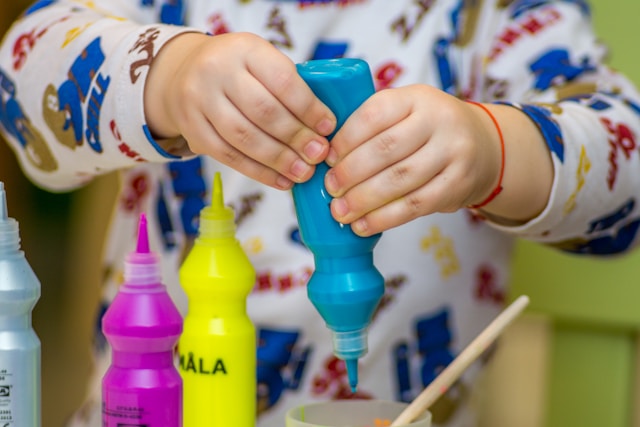
Kids love making things. The secret is to give them materials that feel a little more “real” than the average coloring page.
Watercolor painting: real watercolor paper feels special compared to copy paper.
Step-by-step drawing books: kids love learning how to draw animals, cars, or cartoons in stages.
Jigsaw puzzles: choose puzzles that match their age and patience level.
LEGO invention time: ditch the instruction manual and challenge them to invent their own design.
Pair this with audiobooks or podcasts for kids. That way, their mind stays active while their hands are busy.

A creative family ritual shared online is called “actioning.” Kids pick a song and let the music guide their imagination.
Some children act out a story as if they are in a movie.
Others draw or paint what the song makes them feel.
Parents can join in by asking: “What do you see in your head when this music plays?”
This not only keeps kids engaged, but also helps them explore emotions and creativity in a unique way.

If you want something ready-made, sensory kits and puzzle books are lifesavers.
Young, Wild and Friedman kits: sensory boxes with slime, dough, and themed accessories.
Puzzle sticker books: kids stay motivated to finish the picture, one sticker at a time.
Classic puzzle magazines: Highlights or Grab a Pencil offer hours of quiet engagement for a low cost.
These are simple, affordable ways to give kids independent play options without screens.
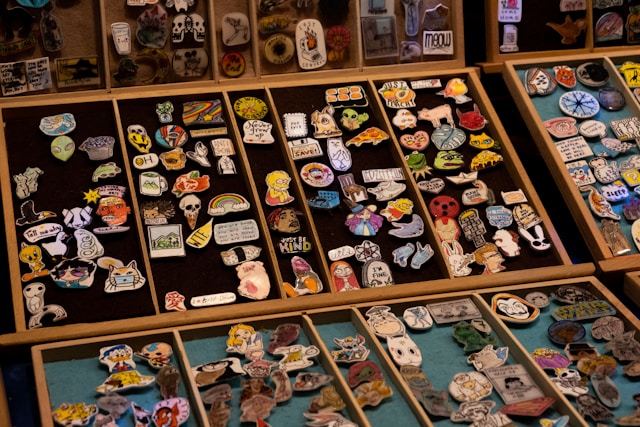
Sometimes the classics work best. Parents on Reddit swear by these screen-free staples:
Sticker collections and trading.
Memory card games.
Scavenger hunts indoors or outside.
Blanket forts with chairs and fairy lights.
Baking cookies or doubling recipes to sneak in some math.
Every activity builds skills without kids even realizing it. Baking teaches fractions, scavenger hunts sharpen focus, and forts spark engineering creativity.
 g
g
Screens are part of modern childhood. They are not the enemy. But balance is everything. Too much passive screen time means less time building resilience, problem-solving, and creativity.
Screen-free time:
Encourages patience.
Builds independence.
Creates shared family memories.
Helps kids discover new hobbies.
If kids say “I’m bored,” remember: boredom is not failure. It is the first step toward creativity.
The next time you are tempted to hand over a phone or tablet, try one of these activities instead. Whether it is painting, puzzle books, music actioning, or baking cookies, you are not just keeping them busy – you are giving them the chance to grow.
Screens will always be there. But the cardboard forts, the painted paper rockets, and the Saturday cookie experiments? Those are the memories that last.
Frequently Asked
XReady Lab offers the largest K–12 STEM VR and Web/PC library with an AI Tutor. The packages include biology, physics, chemistry, and math, covering topics from primary school through high school.
All content is designed to align with major curricula and deliver engaging, interactive learning experiences. New simulations are added monthly.
XReady Lab’s simulations are aligned with IB, Cambridge IGCSE, AS & A Levels, NGSS, College Board, Common Core, TEKS, CBSE, BNCC, the National Curriculum for England, the Italian secondary school curriculum (Scuola Secondaria), and the National Curriculum of the Netherlands (VMBO, HAVO, VWO).
Career Packs are VR simulation bundles that let students explore STEM careers in practice. Current packs include: Future Doctor, Future Nurse, Future Engineer, Future HVAC Engineer, Future Biotechnologist, Future Astronomer, Future Neuroscientist.
New Career Packs are added regularly.
XReady Lab Superhuman AI Tutor works like a real tutor, guiding students step by step instead of giving ready-made answers. It focuses on reasoning, problem-solving, and explaining mistakes to build real understanding.
Created by international STEM Olympiad winners and coaches, it helps prepare for exams, increases memory retention by 40%, and works in real time in both VR and desktop formats with an internet connection.
XReady Lab packages include complimentary teacher training and ready-to-use Lesson Plans and Engagement Playbooks to support engaging lessons.
They guide teachers in integrating VR/web/PC simulations with clear objectives, step-by-step instructions, classroom management strategies, reflection activities, assessments, and technical checklists — helping teachers run effective lessons beyond the simulations themselves.
Simply fill out the free demo form here to get access to demo XReady Lab simulations.
We start with consultation: our team helps plan the VR classroom for your school. You need internet access and a suitable room — allocate about 5 x 5 feet (1.5 x 1.5 m) per student. One headset per two students works well.
Devices and licenses: schools can use existing Meta Quest or Pico devices and purchase licenses, or we can offer discounted devices or a turnkey solution with pre-installed content.
After purchase, we guide device setup and content installation and provide teacher training.
Teachers learn how to run VR lessons using Lesson Plans and Engagement Playbooks, manage screen casting and paired learning, and keep students engaged.
Ongoing support is always available.
VR lessons typically last 5–15 minutes, depending on the simulation, with a recommended class size of up to 20 students. Screen casting is supported and compatible with selected teacher management systems, allowing teachers to launch simulations remotely, monitor progress, and view all devices during lessons.
Teachers are supported with Lesson Plans and Engagement Playbooks that include learning objectives, step-by-step lesson flow, classroom scenarios, reflection questions, practical assignments, and assessment guidance.
XReady Lab is available worldwide and supports 75+ languages. Today, it is used by 800+ schools and 150,000+ students across the globe.
XReady Lab simulations are offered through flexible licensing packages, depending on the format and subjects you need:
If you already have VR headsets, you only purchase licenses. If not, we can also help you choose the most cost-effective setup and licensing model for your school or family.
XReady Lab works with the most widely used standalone VR headsets in schools:
All supported devices are standalone (no PC required), making them easy to deploy and manage in a school environment.
Yes. XReady Lab supports open ecosystems, not closed platforms. Schools can freely use third-party VR content alongside XReady Lab on Meta Quest and PICO headsets.
We encourage schools to diversify their VR classrooms with high-quality educational apps and can recommend tested solutions, helping expand learning beyond STEM into subjects like design, history, environmental studies, and soft skills.
XReady Lab follows school VR safety best practices. VR is recommended for students 10–12+, with short 5–15 minute sessions and seated or safe-zone use under teacher supervision, supported by screen casting.
First-time users adapt gradually. Students with medical conditions require parental and school approval, and hygiene is ensured through regular headset cleaning and replaceable face covers.
Families can access XReady Lab simulations at home in two ways:
