


Here we talk about metaverse instruments for education which you can having only laptop or smartphone. Also check top AI instruments for educators (click).
The metaverse is a persistent shared virtual space where individuals use avatars to interact not only with the environment but also with each other in real-time.
The metaverse offers several compelling advantages for educational settings, serving as a powerful tool to enhance the learning experience. Here’s why:
Metaverse platforms can be accessed via virtual reality (VR) devices or using a computer, tablet, or smartphone, making VR headsets optional rather than mandatory.
Here, we’ll explore educational platforms within the metaverse that do not require VR devices:
Originally a popular entertainment platform among children, Roblox features games and experiences created by its users. While not initially designed for education, Roblox is expanding into educational content. It has received endorsements like the ISTE Seal of Alignment for educational applications.
Enrich your curriculum with 3D educational adventures that leverage students’ creativity, teamwork, and social engagement on the Roblox platform.
Check out educational games and experiences on Roblox here.
This approach demonstrates how the metaverse can be leveraged as a versatile educational tool, accessible across different devices and offering engaging learning opportunities beyond traditional methods.
Roblox Education offers a growing range of immersive learning experiences tailored to different grade levels and subjects. These experiences deliver curriculum-aligned, engaging, and game-based educational content to the global Roblox community through collaborations with educators and developers.
For example, in a game exploring the human immune system, students are immersed inside the body of a patient, witnessing firsthand how the immune system defends against pathogens. Players assume the roles of five types of white blood cells, learning their specific functions and collaborating to protect the host’s health.
On the other hand, UNIVERSE was specifically developed for educational purposes, distinguishing it from Roblox. This classroom tool enhances traditional face-to-face lessons by offering immersive experiences, making it ideal for both in-person and distance education settings. Teachers and students interact using customizable avatars.
UNIVERSE provides flexibility with teacher and student accounts, allowing educators to customize classroom layouts based on class size. Teachers maintain control over virtual lessons, switching between lecture and discussion modes. They can share screens, slides, or webcam feeds to guide lessons and create engaging breakout room scenarios to foster collaboration among students. Quick checks for understanding help assess student comprehension and identify areas needing further explanation.
UNIVERSE is compatible with Windows, ChromeOS, MacOS, and iOS, ensuring seamless operation across desktops, laptops, tablets, and smartphones without requiring additional accessories.
While UNIVERSE is a paid tool, you can explore its features with a free 7-day trial. Visit the UNIVERSE website to calculate software costs by specifying the required number of teacher and student accounts.
Spatial is a versatile metaverse initially designed for general use but adaptable for educational purposes. Users can customize their virtual environments by uploading media and 3D models, and they have access to an integrated Internet browser.
Teachers and students can collaborate in real-time within shared virtual spaces using Spatial. This platform is accessible through VR devices, as well as web and mobile versions.
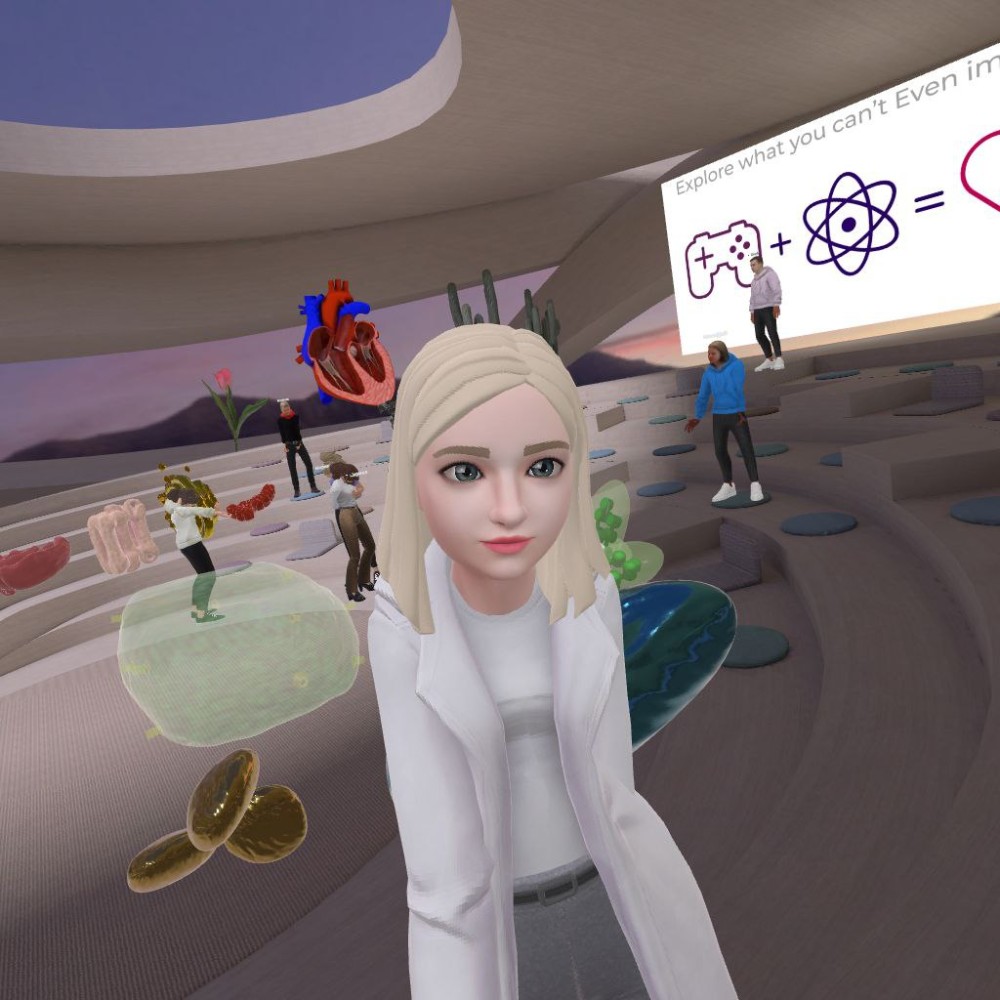
Below is a replicated image from earlier in this article: XReady Lab biologist Sofiia Sosnovskaia captured a virtual selfie while conducting a demonstration lesson in a virtual classroom. In this demo, students (represented by their 3D avatars) explore topics such as cell structure and a model demonstrating the function of the human heart.
If you require high-quality educational content for uploading, including 3D models and curriculum-relevant tests, please contact us ⬇️⬇️⬇️
Free 3D models and test to upload in your Metaverse
While metaverses have primarily been associated with entertainment, there is a growing trend towards their application in education. As highlighted in this article, leveraging educational metaverses often doesn’t necessitate new devices like VR headsets. All that’s required are a computer and a smartphone.
Current tools offer substantial opportunities to enrich educational experiences, boost classroom engagement, and bridge the gap between distance and in-person learning. We anticipate rapid advancements in educational metaverses in the years ahead.
You may like it
Frequently Asked
XReady Lab offers the largest K–12 STEM VR and Web/PC library with an AI Tutor. The packages include biology, physics, chemistry, and math, covering topics from primary school through high school.
All content is designed to align with major curricula and deliver engaging, interactive learning experiences. New simulations are added monthly.
XReady Lab’s simulations are aligned with IB, Cambridge IGCSE, AS & A Levels, NGSS, College Board, Common Core, TEKS, CBSE, BNCC, the National Curriculum for England, the Italian secondary school curriculum (Scuola Secondaria), and the National Curriculum of the Netherlands (VMBO, HAVO, VWO).
Career Packs are VR simulation bundles that let students explore STEM careers in practice. Current packs include: Future Doctor, Future Nurse, Future Engineer, Future HVAC Engineer, Future Biotechnologist, Future Astronomer, Future Neuroscientist.
New Career Packs are added regularly.
XReady Lab Superhuman AI Tutor works like a real tutor, guiding students step by step instead of giving ready-made answers. It focuses on reasoning, problem-solving, and explaining mistakes to build real understanding.
Created by international STEM Olympiad winners and coaches, it helps prepare for exams, increases memory retention by 40%, and works in real time in both VR and desktop formats with an internet connection.
XReady Lab packages include complimentary teacher training and ready-to-use Lesson Plans and Engagement Playbooks to support engaging lessons.
They guide teachers in integrating VR/web/PC simulations with clear objectives, step-by-step instructions, classroom management strategies, reflection activities, assessments, and technical checklists — helping teachers run effective lessons beyond the simulations themselves.
Simply fill out the free demo form here to get access to demo XReady Lab simulations.
We start with consultation: our team helps plan the VR classroom for your school. You need internet access and a suitable room — allocate about 5 x 5 feet (1.5 x 1.5 m) per student. One headset per two students works well.
Devices and licenses: schools can use existing Meta Quest or Pico devices and purchase licenses, or we can offer discounted devices or a turnkey solution with pre-installed content.
After purchase, we guide device setup and content installation and provide teacher training.
Teachers learn how to run VR lessons using Lesson Plans and Engagement Playbooks, manage screen casting and paired learning, and keep students engaged.
Ongoing support is always available.
VR lessons typically last 5–15 minutes, depending on the simulation, with a recommended class size of up to 20 students. Screen casting is supported and compatible with selected teacher management systems, allowing teachers to launch simulations remotely, monitor progress, and view all devices during lessons.
Teachers are supported with Lesson Plans and Engagement Playbooks that include learning objectives, step-by-step lesson flow, classroom scenarios, reflection questions, practical assignments, and assessment guidance.
XReady Lab is available worldwide and supports 75+ languages. Today, it is used by 800+ schools and 150,000+ students across the globe.
XReady Lab simulations are offered through flexible licensing packages, depending on the format and subjects you need:
If you already have VR headsets, you only purchase licenses. If not, we can also help you choose the most cost-effective setup and licensing model for your school or family.
XReady Lab works with the most widely used standalone VR headsets in schools:
All supported devices are standalone (no PC required), making them easy to deploy and manage in a school environment.
Yes. XReady Lab supports open ecosystems, not closed platforms. Schools can freely use third-party VR content alongside XReady Lab on Meta Quest and PICO headsets.
We encourage schools to diversify their VR classrooms with high-quality educational apps and can recommend tested solutions, helping expand learning beyond STEM into subjects like design, history, environmental studies, and soft skills.
XReady Lab follows school VR safety best practices. VR is recommended for students 10–12+, with short 5–15 minute sessions and seated or safe-zone use under teacher supervision, supported by screen casting.
First-time users adapt gradually. Students with medical conditions require parental and school approval, and hygiene is ensured through regular headset cleaning and replaceable face covers.
Families can access XReady Lab simulations at home in two ways:
