
Explore the human body in VR: assemble organs, trace processes like filtration, digestion, respiration, and blood flow, and see how the brain, heart, and endocrine system function in real time.


Every child, at some point, dreams about saving lives. Some imagine holding a stethoscope, listening to a heartbeat, or discovering new cures. But the truth is, the road to becoming a doctor doesn’t start in medical school. It begins much earlier – right in the classroom.
And in 2025, forward-thinking schools are already doing something extraordinary. They are using VR-based science labs that allow students to explore anatomy, physiology, and molecular biology not through textbooks, but through living, moving, interactive experiences.
The Future Doctor package from XReadyLab helps teachers and schools guide students who might become the next generation of healthcare innovators.
👉 Try the Future Doctor experience for your classroom
When students explore medical concepts at an early age, they don’t just memorize facts – they begin to think like scientists. A child who once asked, “Why does my heart beat faster when I run?” can now see it in 3D, observe how oxygen moves, and actually feel the process of life unfolding.
Preparing for a future in medicine early helps develop:
Curiosity about how the body works
Understanding of biology, physics, and chemistry in real-world context
Skills in observation, analysis, and problem-solving
Emotional connection to the idea of helping others
XReadyLab helps schools create this environment – where curiosity meets innovation.
Traditional biology lessons often rely on pictures and lectures. VR changes everything. It surrounds the student with a living system they can touch, rotate, and explore.
Instead of memorizing the structure of the eye from a diagram, they build it like a Lego set – layer by layer – from cornea to retina.
Instead of watching a 2D animation of respiration, they step inside the lungs and see oxygen molecules enter alveoli.
Research shows that immersive learning like this improves memory retention by up to 40 percent. Students don’t just watch – they participate.
👉 Book a demo and see how VR can transform your biology classes
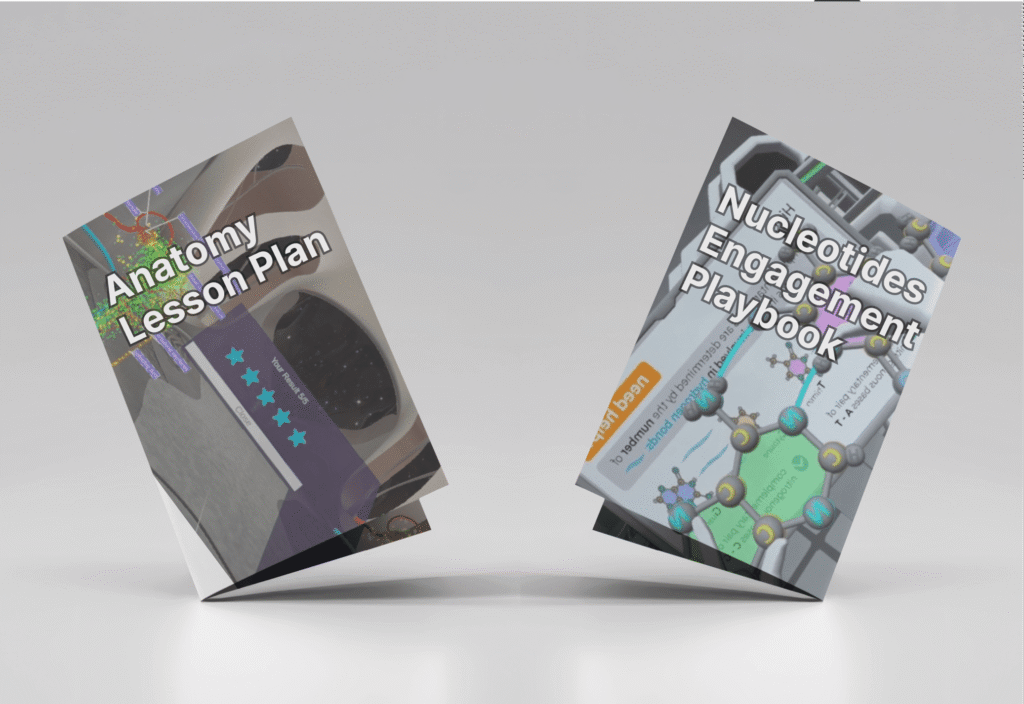
Schools using the Future Doctor VR program appreciate how seamlessly it integrates into existing curricula. All simulations are aligned with IB, NGSS, TEKS, College Board, Cambridge, CBSE, and other international standards.
Each package includes:
Teacher training and onboarding
Ready-to-use lesson plans
Clear simulation instructions for before, during, and after VR sessions
Student playbooks with reflection and analysis questions
Troubleshooting checklists for smooth operation
Teachers say it’s more than just a virtual lab – it’s a complete educational ecosystem.
The Future Doctor collection covers the most important foundations for a medical career: human anatomy, physiology, and molecular and cellular biology. Below are the main VR labs included, each designed to help students connect theory with practice.
Human Eye
Assemble the entire structure of the eye step-by-step.
Learn how light travels, how the pupil reacts, and how the lens focuses.
Strengthen understanding through spatial, visual learning.
Gas Exchange in Alveoli
Observe oxygen and carbon dioxide exchange in the lungs.
Learn about pneumocytes, macrophages, and how they protect the body.
Reinforce key respiratory system concepts through interaction.
Animal Cell
Explore the cell as a miniature world.
Identify organelles like mitochondria, nucleus, and Golgi apparatus.
Develop analytical skills by seeing how all cell parts work together.
Mitosis
Recreate every mitotic phase step by step.
Watch chromosomes move and duplicate.
Understand the process of cell division visually and logically.
Meiosis
Compare meiosis with mitosis to understand reproductive cell division.
Watch how chromosome numbers are reduced.
See how diversity appears in gamete formation.
Protein Biosynthesis
Follow the stages of transcription and translation.
Watch how DNA turns into functional proteins.
Understand how cell organelles interact to create life’s building blocks.
Nucleotide Factory
Visualize how DNA is built from nucleotides.
Understand complementary base-pairing.
Learn how replication ensures genetic stability.
Enzymes
Explore how enzymes catalyze biochemical reactions.
See real-time molecular interactions that drive metabolism.
Understand the detoxification and repair processes in cells.
Metabolism: Glycolysis
Discover how glucose is broken down in the first stage of respiration.
Identify all inputs and outputs of the process.
Understand energy release at the molecular level.
Metabolism: Link Reaction
See how pyruvate turns into acetyl-CoA.
Understand how this step connects glycolysis to the Krebs cycle.
Strengthen knowledge of energy conversion.
Observe the full process of how cells generate energy.
Learn the roles of NADH, FADH₂, and CO₂ production.
Connect the abstract process to real cell structures.
Metabolism: Oxidative Phosphorylation
Watch ATP being created inside mitochondria.
Learn how oxygen powers energy production.
Understand the proton gradient and its critical role in life processes.
Every VR lab comes with more than just a simulation. It includes a full classroom cycle:
Before the VR session: organizing groups, setting learning goals
During the session: guided exploration, teacher prompts
After the session: reflection, analysis, and evaluation
Assessment: ready-made checklists and skill-based tasks
These playbooks transform VR from an add-on into a structured, high-impact learning journey. Teachers don’t just show a simulation – they teach through it.
👉 Explore the Future Doctor classroom solution
When students interact with the human body in virtual space, they stop being passive learners. They become explorers. Future doctors start thinking scientifically, asking deeper questions, and connecting dots between systems and processes.
And it’s not just about biology – it’s about developing soft and analytical skills that every doctor needs:
Attention to detail
Critical reasoning
Patience and responsibility
Curiosity and empathy
It’s the perfect balance between science and humanism, and schools that use VR are already seeing higher engagement and deeper retention.
Medicine is evolving fast. The doctors of tomorrow will need to understand not only anatomy, but also data science, genetics, and biotechnology. Giving students a hands-on experience early helps them approach these challenges confidently.
A student who can see how a mitochondrion produces ATP, or how light refracts inside the eye, will never forget it. That’s what VR does – it makes learning unforgettable.
A future doctor doesn’t start their path with a textbook. It starts with a spark of curiosity.
When schools give students the tools to explore life itself in immersive, interactive ways, that spark becomes a direction – and sometimes, a lifelong calling.
The Future Doctor program isn’t just education. It’s inspiration in action.
👉 Bring the Future Doctor experience to your school today
Frequently Asked
XReady Lab offers the largest K–12 STEM VR and Web/PC library with an AI Tutor. The packages include biology, physics, chemistry, and math, covering topics from primary school through high school.
All content is designed to align with major curricula and deliver engaging, interactive learning experiences. New simulations are added monthly.
XReady Lab’s simulations are aligned with IB, Cambridge IGCSE, AS & A Levels, NGSS, College Board, Common Core, TEKS, CBSE, BNCC, the National Curriculum for England, the Italian secondary school curriculum (Scuola Secondaria), and the National Curriculum of the Netherlands (VMBO, HAVO, VWO).
Career Packs are VR simulation bundles that let students explore STEM careers in practice. Current packs include: Future Doctor, Future Nurse, Future Engineer, Future HVAC Engineer, Future Biotechnologist, Future Astronomer, Future Neuroscientist.
New Career Packs are added regularly.
XReady Lab Superhuman AI Tutor works like a real tutor, guiding students step by step instead of giving ready-made answers. It focuses on reasoning, problem-solving, and explaining mistakes to build real understanding.
Created by international STEM Olympiad winners and coaches, it helps prepare for exams, increases memory retention by 40%, and works in real time in both VR and desktop formats with an internet connection.
XReady Lab packages include complimentary teacher training and ready-to-use Lesson Plans and Engagement Playbooks to support engaging lessons.
They guide teachers in integrating VR/web/PC simulations with clear objectives, step-by-step instructions, classroom management strategies, reflection activities, assessments, and technical checklists — helping teachers run effective lessons beyond the simulations themselves.
Simply fill out the free demo form here to get access to demo XReady Lab simulations.
We start with consultation: our team helps plan the VR classroom for your school. You need internet access and a suitable room — allocate about 5 x 5 feet (1.5 x 1.5 m) per student. One headset per two students works well.
Devices and licenses: schools can use existing Meta Quest or Pico devices and purchase licenses, or we can offer discounted devices or a turnkey solution with pre-installed content.
After purchase, we guide device setup and content installation and provide teacher training.
Teachers learn how to run VR lessons using Lesson Plans and Engagement Playbooks, manage screen casting and paired learning, and keep students engaged.
Ongoing support is always available.
VR lessons typically last 5–15 minutes, depending on the simulation, with a recommended class size of up to 20 students. Screen casting is supported and compatible with selected teacher management systems, allowing teachers to launch simulations remotely, monitor progress, and view all devices during lessons.
Teachers are supported with Lesson Plans and Engagement Playbooks that include learning objectives, step-by-step lesson flow, classroom scenarios, reflection questions, practical assignments, and assessment guidance.
XReady Lab is available worldwide and supports 75+ languages. Today, it is used by 800+ schools and 150,000+ students across the globe.
XReady Lab simulations are offered through flexible licensing packages, depending on the format and subjects you need:
If you already have VR headsets, you only purchase licenses. If not, we can also help you choose the most cost-effective setup and licensing model for your school or family.
XReady Lab works with the most widely used standalone VR headsets in schools:
All supported devices are standalone (no PC required), making them easy to deploy and manage in a school environment.
Yes. XReady Lab supports open ecosystems, not closed platforms. Schools can freely use third-party VR content alongside XReady Lab on Meta Quest and PICO headsets.
We encourage schools to diversify their VR classrooms with high-quality educational apps and can recommend tested solutions, helping expand learning beyond STEM into subjects like design, history, environmental studies, and soft skills.
XReady Lab follows school VR safety best practices. VR is recommended for students 10–12+, with short 5–15 minute sessions and seated or safe-zone use under teacher supervision, supported by screen casting.
First-time users adapt gradually. Students with medical conditions require parental and school approval, and hygiene is ensured through regular headset cleaning and replaceable face covers.
Families can access XReady Lab simulations at home in two ways: