


A lot of children say they want to work in medicine.
Most imagine doctors or surgeons. Fewer think about the people who actually see what is happening inside the body first.
But here is the reality.
Modern medicine runs on images.
X-rays. Ultrasound. CT. MRI. Diagnostic scans that guide almost every clinical decision. And behind every one of those images stands a radiology technician.
This profession does not start in medical school. It starts much earlier, in school, when students first encounter anatomy, physics, and the logic of how invisible things become visible.
That is exactly why schools are beginning to look closely at the Future Radiology Technician career package.
Why Radiology Technician Is a Career in High Demand
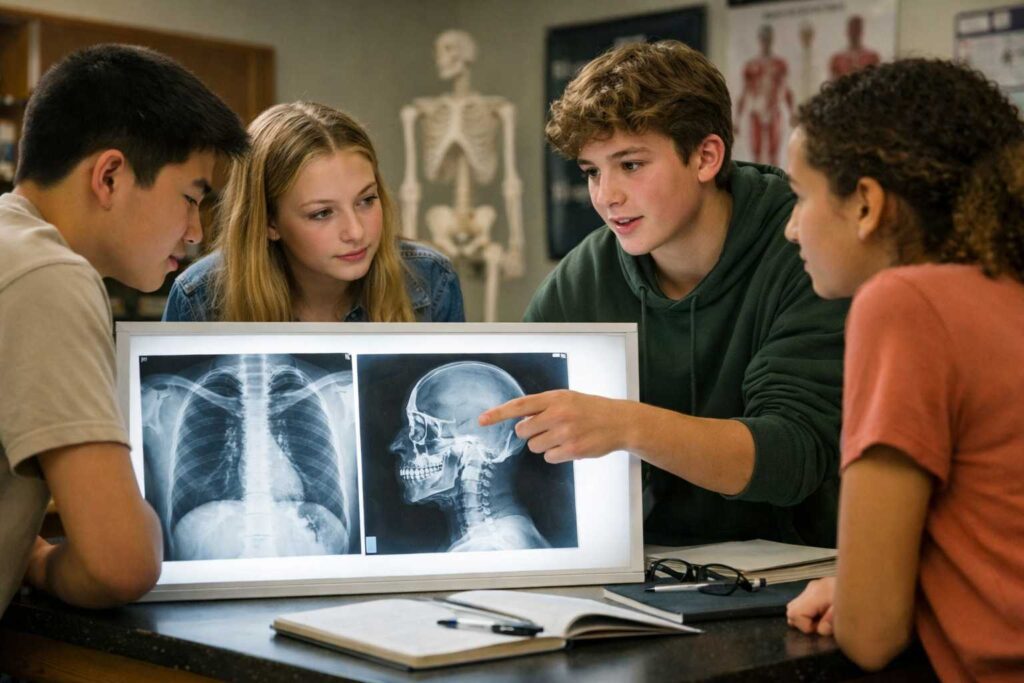
This is not a trendy prediction. It is a structural shift in healthcare.
Several forces are working at the same time:
-
Chronic diseases are increasing, which means more visual diagnostics are required.
-
The population is aging, and older patients need imaging more often.
-
There is a clear shortage of trained personnel, especially in the US.
-
Training time is shorter than for doctors, while salaries remain high.
-
Schools value programs that lead to stable, in-demand jobs, which is why radiology fits perfectly into CTE pathways.
Radiology Technician consistently ranks among the Top 20 fastest growing medical jobs. Hospitals do not wait months to hire these specialists. They are needed immediately.
This makes radiology one of the rare medical careers where students can enter the workforce relatively quickly and with strong job security.
Why Preparation Should Start in School
Radiology is not about memorizing buttons on a machine.
It is about understanding what you are imaging and why the image looks the way it does.
That understanding is built on two foundations:
-
human anatomy
-
physics of imaging
If students meet these ideas early, not as abstract theory but as something they can interact with, the profession stops feeling intimidating and starts feeling logical.
This is where VR-based learning becomes especially powerful.
Why VR Works So Well for Radiology Education
Traditional lessons often show static diagrams or short videos. Students see an image but do not connect it to the real body or the physical process behind it.
VR changes this completely.
With VR:
-
students explore anatomy in 3D, not on paper
-
organs are spatial, not flat
-
physics becomes visible, not abstract
-
mistakes are safe and repeatable
-
learning happens through action, not observation
Research shows that immersive learning improves memory retention by up to 40 percent. Students remember what they do, not just what they hear.
You can explore how this works in practice here.
What Schools Get Besides Simulations
The Future Radiology Technician package is not just a set of VR labs.
Schools also receive:
-
ready-to-use lesson plans
-
engagement playbooks
-
clear instructions for before, during, and after simulations
-
guidance on group organization
-
reflection and analysis questions
-
troubleshooting checklists for technical issues
-
complimentary teacher training
This makes it easy to integrate the content into existing curricula without overloading teachers.
All simulations align with IB, NGSS, TEKS College Board, Cambridge, CBSE, and other national and international standards.
Inside the Future Radiology Technician Package
The package is built in two logical layers: anatomy and physics.
Together, they explain what radiology technicians see and how imaging systems work.
1. Human Anatomy – What We Image
These simulations build a clear mental model of the body structures that appear in diagnostic imaging.
VR Anatomy: Skeleton
Why study it?
-
X-rays are primarily about bones, joints, and skeletal alignment.
-
Students learn how fractures, deformities, and joint issues appear in imaging.
VR Anatomy: Heart and Major Blood Vessels
Why study it?
-
Chest X-rays and echocardiography depend on understanding heart position and vessel layout.
-
Students connect anatomy to cardiovascular diagnostics.
VR Anatomy: Respiratory System
Why study it?
-
Lung X-rays are among the most common examinations.
-
Students explore how airways and lung tissue relate to diagnostic images.
VR Anatomy: Digestive System
Why study it?
-
Contrast studies of the gastrointestinal tract require precise anatomical knowledge.
-
Students learn how structure affects image interpretation.
VR Anatomy: Kidney, Nephron, Excretory System
Why study it?
-
Kidney ultrasound is one of the most frequent diagnostic procedures worldwide.
-
Students understand how filtration structures relate to imaging results.
VR Anatomy: Brain and Synapse
Why study it?
-
CT and MRI rely on precise brain structure understanding.
-
Students see how neural anatomy translates into diagnostic scans.
VR Anatomy: Human Eye
Why study it?
-
Imaging of sensory organs requires detailed anatomical orientation.
-
Students explore layered structures and spatial relationships.
VR Anatomy: Endocrine System
Why study it?
-
Gland research is one of the most common diagnostic tasks.
-
Students learn how hormonal organs are distributed and visualized.
2. The Physics of Imaging – How Images Are Formed
Understanding physics is what separates a technician who understands the system from one who only follows instructions.
Optics as the Core of Imaging
These simulations explain how waves, signals, and focus create images in ultrasound, X-ray, CT, MRI, and XR systems.
Reflection and Refraction
-
The principle behind ultrasound.
-
Waves reflect from tissues to form an image.
Lenses
-
Focusing waves and signals.
-
Clear analogy with ultrasonic sensors and imaging systems.
Diffraction
-
Explains image resolution.
-
Students see why sharpness has physical limits.
Interference
-
Core principle of signal formation in ultrasound sensors.
-
Enhances realism and understanding of artifacts.
Interference and Diffraction Together
-
Explains sharpness, noise, and imaging artifacts.
-
This knowledge distinguishes a technician who understands physics from one who just presses buttons.
Electricity Fundamentals
Electrification
- How sensors and generators are powered.
-
How imaging devices operate internally.
Coulomb’s Law
-
The basis of charged particle detectors and sensors.
-
Helps students understand how signals are detected and processed.
How Schools Use This Package in Practice
Schools integrate the Future Radiology Technician package in several ways:
-
as part of CTE healthcare tracks
-
inside biology and physics courses
-
in career exploration programs
-
during summer or after-school STEM sessions
Students do not just learn about radiology. They experience it from the inside.
To see how schools implement this solution, you can request a demo here.
Why This Career Matters for the Future
Radiology technicians sit at the intersection of:
-
medicine
-
physics
-
technology
-
patient care
It is a profession that will not disappear with automation. On the contrary, as imaging technologies become more advanced, technicians who understand both anatomy and physics become even more valuable.
For students who like science but want a clear, practical, and in-demand medical career, radiology is one of the strongest options available today.
And for schools, it is an opportunity to prepare students not just for exams, but for real jobs the world truly needs.
Final Thought
Healthcare begins with seeing.
Before treatment, before decisions, before action, there is an image.
Radiology technicians make that image possible.
When schools introduce students to this profession early, through immersive and meaningful learning, they are not just teaching science. They are opening a door to a future that is stable, respected, and deeply human.
If your school is exploring healthcare career pathways, this is one worth serious attention.
Explore the Future Radiology Technician classroom solution here.