


Let’s be honest: virtual reality in education sounds like the coolest thing since sliced bread. The idea of students stepping into VR classrooms, exploring VR biology labs, or traveling across the solar system in VR physics is undeniably appealing. But is VR truly the all-encompassing cure that will magically fix disengaged students, outdated teaching methods, and complex STEM topics? Let’s take a closer look, referencing real examples of VR learning that bring this debate to life—and see where VR is brilliant and where it might fall short.

When people talk about VR for education, biology is often the first subject that comes to mind. Imagine your class exploring the inner workings of a cell in 3D rather than staring at flat illustrations.

For instance, XReady Lab’s VR Cell showcases how students can “step into” organelles instead of just looking at them in a textbook. This approach transforms cell biology into a hands-on journey, helping learners to see the life and structure inside a plant or animal cell. The result? Real engagement with a topic that’s often seen as too abstract.
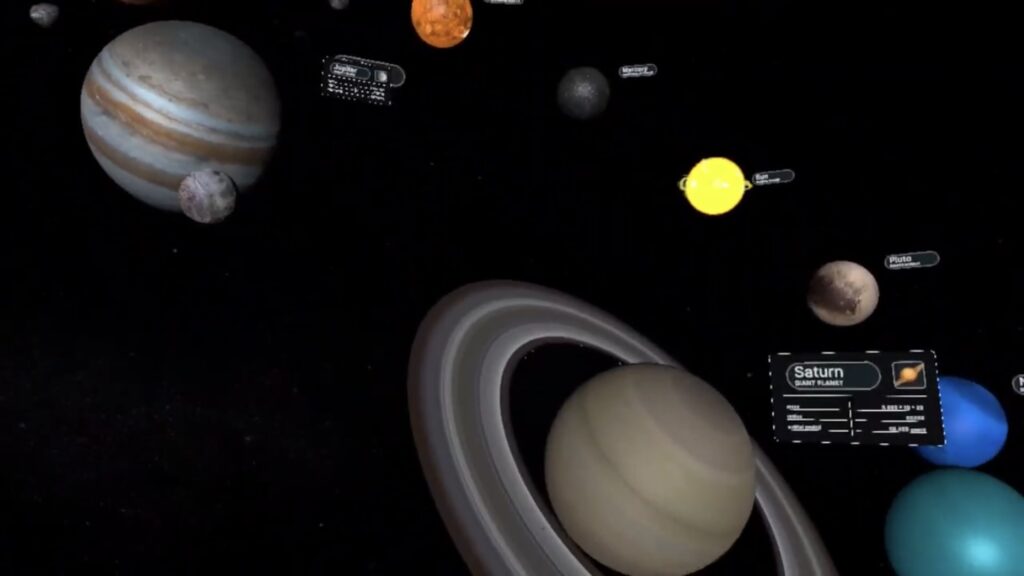
Beyond biology, physics also benefits from immersive VR, letting students perform advanced experiments without the safety risks or expensive lab equipment.

The power of virtual reality education doesn’t stop at labs. It can also address critical social and emotional aspects of school life.
It’s no secret that VR can also revolutionize home learning. Parents often panic when they see kids glued to gaming headsets or phones, assuming zero educational value. But that doesn’t have to be the case.
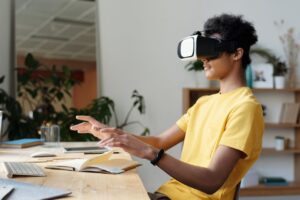
Given these examples, it might seem VR is unstoppable. But is it really a “magic bullet” for every problem in education? Possibly not. Even the most engaging VR learning platform can’t fix every systemic issue:
“VR education is awesome,” you say. “Why aren’t all schools using it?” The simple answer is that while VR offers incredible advantages—like interactive classroom activities, improved STEM lab experiences, and digital classroom innovations—it’s not the only path forward.
Still, the possibilities are thrilling. Through carefully designed VR lessons, students can explore everything from the internal structure of cells to electrification in physics, from bullying interventions to emergency responses. Used thoughtfully, VR can transform how we learn and teach.
Just remember: no single technology instantly solves all educational dilemmas. By blending virtual reality in education with strong pedagogy, relevant curricula, and ongoing teacher support, we stand a better chance of giving kids the rich, future-focused learning experiences they deserve.
Frequently Asked
XReady Lab offers the largest K–12 STEM VR and Web/PC library with an AI Tutor. The packages include biology, physics, chemistry, and math, covering topics from primary school through high school.
All content is designed to align with major curricula and deliver engaging, interactive learning experiences. New simulations are added monthly.
XReady Lab’s simulations are aligned with IB, Cambridge IGCSE, AS & A Levels, NGSS, College Board, Common Core, TEKS, CBSE, BNCC, the National Curriculum for England, the Italian secondary school curriculum (Scuola Secondaria), and the National Curriculum of the Netherlands (VMBO, HAVO, VWO).
Career Packs are VR simulation bundles that let students explore STEM careers in practice. Current packs include: Future Doctor, Future Nurse, Future Engineer, Future HVAC Engineer, Future Biotechnologist, Future Astronomer, Future Neuroscientist.
New Career Packs are added regularly.
XReady Lab Superhuman AI Tutor works like a real tutor, guiding students step by step instead of giving ready-made answers. It focuses on reasoning, problem-solving, and explaining mistakes to build real understanding.
Created by international STEM Olympiad winners and coaches, it helps prepare for exams, increases memory retention by 40%, and works in real time in both VR and desktop formats with an internet connection.
XReady Lab packages include complimentary teacher training and ready-to-use Lesson Plans and Engagement Playbooks to support engaging lessons.
They guide teachers in integrating VR/web/PC simulations with clear objectives, step-by-step instructions, classroom management strategies, reflection activities, assessments, and technical checklists — helping teachers run effective lessons beyond the simulations themselves.
Simply fill out the free demo form here to get access to demo XReady Lab simulations.
We start with consultation: our team helps plan the VR classroom for your school. You need internet access and a suitable room — allocate about 5 x 5 feet (1.5 x 1.5 m) per student. One headset per two students works well.
Devices and licenses: schools can use existing Meta Quest or Pico devices and purchase licenses, or we can offer discounted devices or a turnkey solution with pre-installed content.
After purchase, we guide device setup and content installation and provide teacher training.
Teachers learn how to run VR lessons using Lesson Plans and Engagement Playbooks, manage screen casting and paired learning, and keep students engaged.
Ongoing support is always available.
VR lessons typically last 5–15 minutes, depending on the simulation, with a recommended class size of up to 20 students. Screen casting is supported and compatible with selected teacher management systems, allowing teachers to launch simulations remotely, monitor progress, and view all devices during lessons.
Teachers are supported with Lesson Plans and Engagement Playbooks that include learning objectives, step-by-step lesson flow, classroom scenarios, reflection questions, practical assignments, and assessment guidance.
XReady Lab is available worldwide and supports 75+ languages. Today, it is used by 800+ schools and 150,000+ students across the globe.
XReady Lab simulations are offered through flexible licensing packages, depending on the format and subjects you need:
If you already have VR headsets, you only purchase licenses. If not, we can also help you choose the most cost-effective setup and licensing model for your school or family.
XReady Lab works with the most widely used standalone VR headsets in schools:
All supported devices are standalone (no PC required), making them easy to deploy and manage in a school environment.
Yes. XReady Lab supports open ecosystems, not closed platforms. Schools can freely use third-party VR content alongside XReady Lab on Meta Quest and PICO headsets.
We encourage schools to diversify their VR classrooms with high-quality educational apps and can recommend tested solutions, helping expand learning beyond STEM into subjects like design, history, environmental studies, and soft skills.
XReady Lab follows school VR safety best practices. VR is recommended for students 10–12+, with short 5–15 minute sessions and seated or safe-zone use under teacher supervision, supported by screen casting.
First-time users adapt gradually. Students with medical conditions require parental and school approval, and hygiene is ensured through regular headset cleaning and replaceable face covers.
Families can access XReady Lab simulations at home in two ways:
