


For most families, the best screen-free STEM kits are MEL Science and CrunchLabs. MEL Science focuses on hands-on chemistry and physics experiments with real lab tools, while CrunchLabs teaches engineering and mechanics through build-and-play projects.
Yes. Both MEL Science and CrunchLabs can be used fully offline with printed instructions. Optional apps or videos are available but not required, making them suitable for families limiting screen time.
Most screen-free STEM kits are designed for children aged 8 and up. Younger kids can participate with adult help, especially for chemistry-based experiments.
Parents often choose between MEL Science and CrunchLabs. MEL Science delivers monthly chemistry and physics experiments with real lab tools and premium materials, while CrunchLabs sends engineering build projects like disc launchers and gadgets. Both kits come with clear instructions, optional app or video support, and are designed for ages 8+.
MEL Science tends to work best for kids who enjoy lab-style experiments and visible reactions, while CrunchLabs is better suited for children who prefer building, assembling, and mechanical problem-solving.
At XReady Lab we’re building web and virtual reality labs with an AI STEM tutor, but we also love checking out hands-on STEM products for kids. When parents ask us what we recommend for variety and screen-free learning, we often point them to MEL Science and CrunchLabs — real experiments delivered to your doorstep, perfect for keeping curiosity alive without extra screen time.
Hands-on kits and immersive digital labs don’t compete — together they help kids build both tactile intuition and conceptual understanding.
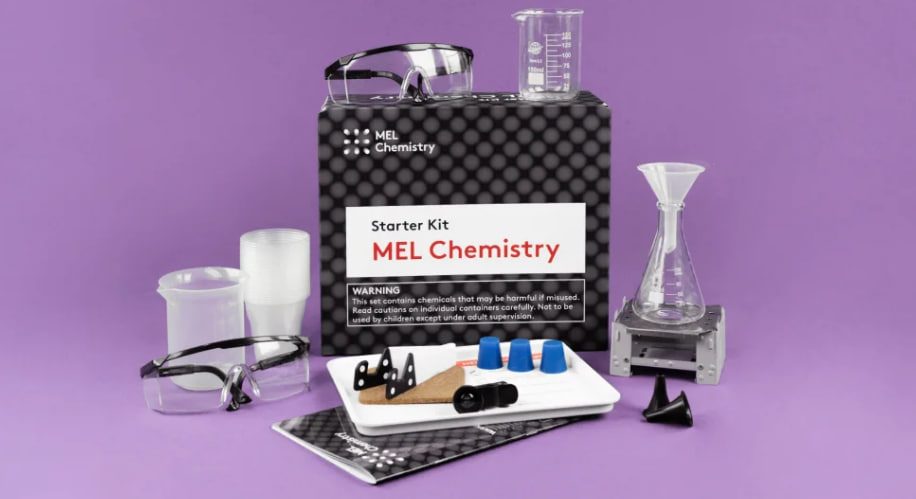
MEL Science is designed for children who like to mix, pour, and watch things change right in front of them. Each subscription begins with a starter kit that includes reusable lab gear: beakers, safety goggles, measuring tools, and a tray that keeps the kitchen table safe. Every month after that, a new box arrives with two or three themed experiments and all the chemicals or materials required.
Some popular experiments parents mention include growing metallic “tin hedgehog” crystals, making a sugar snake foam eruption, or testing acids and bases with colorful indicators. Instructions are clear and come in both printed and app versions, so families can stay completely screen free or use the interactive app for extra explanations.
“My now 8 year old nephew LOVED his STEM kits so much that he was automatically switched to physics kits when he completed all the STEM during year 2. We’ve now signed him up for a 3rd year, doing chemistry. The quality of the materials is really good. His younger sister has kits from another company and you can really tell a difference in the quality!”
“Excellent present for an 8-9 year old curious kid. We have enjoyed building all the models together and reading more about science with my son. It was our father and son time!”
“Highly recommend!! Great customer service that stands behind their products with prompt responses and replacement parts or boxes as needed. My kids rip the boxes open as fast as they come. Great for homeschool education. My son loves the interactive app. My daughter has no interest in the app but loves the easy to follow directions. No disappointed kids here!”
“The only downside is the high cost. Having videos on the app and all supplies included do make it worth it, but it is still expensive.”
Parents consistently praise the quality of the materials, the depth of the science, and the way MEL kits motivate kids to keep learning. The biggest caution is price: these are premium experiments and you can feel it in the subscription fee.
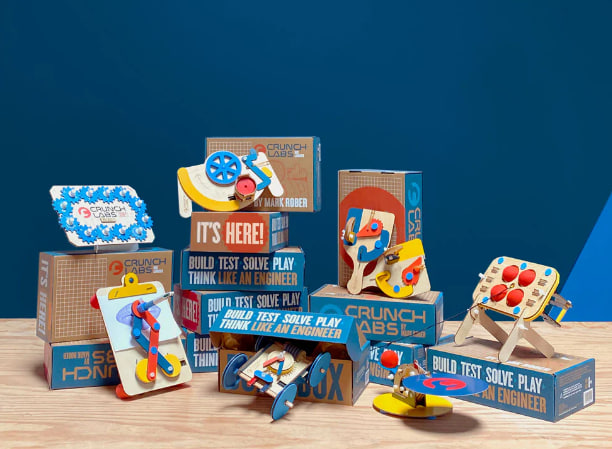
CrunchLabs, created by engineer and YouTuber Mark Rober, focuses on engineering builds that teach physics concepts through play. Each Build Box arrives with every nut, screw, and connector needed to create a working gadget such as disc launchers, mechanical toys, or small machines powered by rubber bands or motors. A paper booklet provides step by step instructions, and there are optional videos if your child enjoys seeing the project explained by Rober himself.
The projects are designed for roughly 8-13 year olds, and many can be built in under an hour. Kids learn about kinetic energy, simple machines, and design thinking while ending up with a toy they can actually use.
“My son absolutely loved the first build box.”
“My 11 and 8 year old are ecstatic when they got their CrunchLabs box!”
“Disc launcher was a cool first project that my 8 year old could do by himself (other than the rubber bands, which I was happy to help with). We enjoyed learning about kinetic energy on the video! The cord broke the same day he built it, which was disappointing, but we bought it for the project and experience, not long term use.”
“My 10 year old grandson loved his gift and immediately put it together without any difficulty so thank you.”
“Great products. My grandchildren love the monthly Crunch projects and look forward to the arrivals.”
Parents love the excitement these boxes generate and the way kids can often build them independently. Occasional issues like a broken cord or delayed customer support do appear, but the overall verdict is enthusiastic.
Both MEL Science and CrunchLabs deliver genuine screen free STEM learning, but they scratch different itches:
| Feature | MEL Science | CrunchLabs |
|---|---|---|
| Learning style | Hands-on science, observation | Hands-on building, problem-solving |
| Focus | Chemistry, physics, real chemical reactions | Engineering, mechanical builds, kinetic energy |
| Best age range | 8+ (with adult help for younger kids) | 8-13 |
| Typical session | 30-45 minutes per experiment | 30-60 minutes per build |
| Materials | Chemicals, lab equipment, reusable tools | Mechanical parts, motors, rubber bands |
| Screen use | Optional app or VR extras | Optional instruction videos |
For a child fascinated by color changes, bubbling reactions, and real science labs, MEL Science is unbeatable. For a builder who loves gadgets and moving parts, CrunchLabs brings the thrill of engineering to the kitchen table.
Screen free STEM time is more than a trend. It is a way to give kids a break from constant digital input while keeping curiosity alive. Kits like MEL Science and CrunchLabs arrive ready to use, with professional grade materials and carefully tested experiments that actually work. Whether your child prefers mixing chemicals or assembling machines, these boxes turn the home into a small but powerful science lab.
Parents call them “excellent presents,” “high quality,” and “worth every penny” because they transform passive learning into something tangible. And that kind of hands on discovery is the best screen break any family could ask for.
In 2026, the most effective learning at home combines curiosity, real materials, and meaningful experiences — not endless screen time.
Frequently Asked
XReady Lab offers the largest K–12 STEM VR and Web/PC library with an AI Tutor. The packages include biology, physics, chemistry, and math, covering topics from primary school through high school.
All content is designed to align with major curricula and deliver engaging, interactive learning experiences. New simulations are added monthly.
XReady Lab’s simulations are aligned with IB, Cambridge IGCSE, AS & A Levels, NGSS, College Board, Common Core, TEKS, CBSE, BNCC, the National Curriculum for England, the Italian secondary school curriculum (Scuola Secondaria), and the National Curriculum of the Netherlands (VMBO, HAVO, VWO).
Career Packs are VR simulation bundles that let students explore STEM careers in practice. Current packs include: Future Doctor, Future Nurse, Future Engineer, Future HVAC Engineer, Future Biotechnologist, Future Astronomer, Future Neuroscientist.
New Career Packs are added regularly.
XReady Lab Superhuman AI Tutor works like a real tutor, guiding students step by step instead of giving ready-made answers. It focuses on reasoning, problem-solving, and explaining mistakes to build real understanding.
Created by international STEM Olympiad winners and coaches, it helps prepare for exams, increases memory retention by 40%, and works in real time in both VR and desktop formats with an internet connection.
XReady Lab packages include complimentary teacher training and ready-to-use Lesson Plans and Engagement Playbooks to support engaging lessons.
They guide teachers in integrating VR/web/PC simulations with clear objectives, step-by-step instructions, classroom management strategies, reflection activities, assessments, and technical checklists — helping teachers run effective lessons beyond the simulations themselves.
Simply fill out the free demo form here to get access to demo XReady Lab simulations.
We start with consultation: our team helps plan the VR classroom for your school. You need internet access and a suitable room — allocate about 5 x 5 feet (1.5 x 1.5 m) per student. One headset per two students works well.
Devices and licenses: schools can use existing Meta Quest or Pico devices and purchase licenses, or we can offer discounted devices or a turnkey solution with pre-installed content.
After purchase, we guide device setup and content installation and provide teacher training.
Teachers learn how to run VR lessons using Lesson Plans and Engagement Playbooks, manage screen casting and paired learning, and keep students engaged.
Ongoing support is always available.
VR lessons typically last 5–15 minutes, depending on the simulation, with a recommended class size of up to 20 students. Screen casting is supported and compatible with selected teacher management systems, allowing teachers to launch simulations remotely, monitor progress, and view all devices during lessons.
Teachers are supported with Lesson Plans and Engagement Playbooks that include learning objectives, step-by-step lesson flow, classroom scenarios, reflection questions, practical assignments, and assessment guidance.
XReady Lab is available worldwide and supports 75+ languages. Today, it is used by 800+ schools and 150,000+ students across the globe.
XReady Lab simulations are offered through flexible licensing packages, depending on the format and subjects you need:
If you already have VR headsets, you only purchase licenses. If not, we can also help you choose the most cost-effective setup and licensing model for your school or family.
XReady Lab works with the most widely used standalone VR headsets in schools:
All supported devices are standalone (no PC required), making them easy to deploy and manage in a school environment.
Yes. XReady Lab supports open ecosystems, not closed platforms. Schools can freely use third-party VR content alongside XReady Lab on Meta Quest and PICO headsets.
We encourage schools to diversify their VR classrooms with high-quality educational apps and can recommend tested solutions, helping expand learning beyond STEM into subjects like design, history, environmental studies, and soft skills.
XReady Lab follows school VR safety best practices. VR is recommended for students 10–12+, with short 5–15 minute sessions and seated or safe-zone use under teacher supervision, supported by screen casting.
First-time users adapt gradually. Students with medical conditions require parental and school approval, and hygiene is ensured through regular headset cleaning and replaceable face covers.
Families can access XReady Lab simulations at home in two ways:
