menu

Modern Kids, Modern Ethics: How Virtual‑Reality Classrooms Replace Animal Dissections in 2025

The smell of formaldehyde and the sight of a preserved frog on a tray once defined “hands‑on” biology. For Gen Alpha—the eco‑minded, cruelty‑conscious students now filling our schools—that scene feels dated, even disturbing. Plant‑based diets, climate‑activist role models, and nonstop social media have reshaped what young people consider ethical science. When a lesson crosses that line, engagement plummets.

So how do teachers protect the practical side of learning while respecting new values? Let’s dive into why expectations shifted, what alternatives work, and how virtual‑reality classrooms keep inquiry alive without a single scalpel.

1. Why Gen Alpha Rejects Traditional Dissection

• Compassion culture. YouTube channels showing rescued farm animals rack up millions of views. Cutting a creature open clashes with a daily feed of vegan recipes and wildlife‑rehab stories.
• Digital immersion from birth. Students used touchscreens before they could write cursive. If a digital‑classroom tool can reveal the inside of a lung in 8K detail, a preserved specimen looks crude.
• Climate and sustainability mindset. Reducing waste and protecting biodiversity feel urgent, not abstract. Preserving dozens of animals for annual labs sends the wrong signal.

2. Survey of Ethical, Hands‑On Alternatives
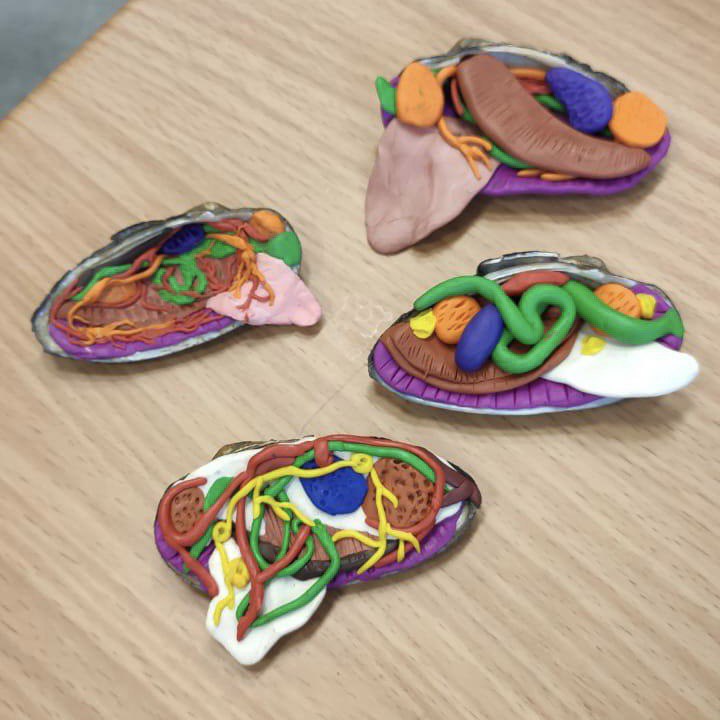
Photo by: https://www.linkedin.com/in/azamat-driaev-0b482bb3/
Method What Students Do Why It Clicks in 2025
Clay & Eco‑clay Models Sculpt hearts, neurons, or lungs from biodegradable materials. Boosts creativity and fine‑motor skills; zero ethical concerns.
High‑Fidelity Silicone Kits Reusable organs with realistic texture and color. No preservatives, repeatable for practice or make‑up labs.
Immersive Dissection Simulators Strap on a headset and peel back virtual frog tissues layer by layer. Delivers true interactivity, detailed visuals, and built‑in assessments.
Teacher tip: Combine approaches—start with clay to build spatial awareness, then move into a headset for step‑by‑step virtual exploration.

3. Case Study: Frog Dissection Goes Digital

Dissection Simulator: Frog Edition

The Dissection Simulator — Frog Edition on the Meta Quest store drops learners into a 3‑D lab where:

  • Each incision is guided by on‑screen prompts, so students can’t “do it wrong.”

  • A zoom function dives from whole body to cellular structures in seconds.

  • Unlimited resets let classes practice until the anatomy sticks.

Early trials show a double win: students remember more anatomy terms and report lower stress compared with physical labs.

4. Maintaining Rigor Across All Sciences

Ethical upgrades shouldn’t water down scientific rigor, and immersive technology proves they don’t have to. In physics, students can launch virtual projectiles from towering cliffs, recording trajectories and manipulating gravity without shattering a single beaker. Chemistry lessons move volatile experiments into a sealed digital hood, where learners tweak reagents and observe instant results—no fumes, no waste, just pure inquiry. Environmental‑science classes now model global carbon‑capture strategies on simulated planets, adjusting variables and watching real‑time climate data respond. By embedding these virtual reality learning experiences into the STEM lab, schools meet safety requirements, respect modern ethics, and still preserve the depth and excitement of a truly experiment‑driven curriculum.

5. Quick Wins for Teachers on Tight Schedules

  1. Ethics Warm‑Up (3 minutes). Start class with a question—“Should animals ever be used in research?”—and collect anonymous yes/no votes on a tablet. Reveal the split, then segue into your lesson.

  2. Build‑Then‑Explore (20 minutes). Students sculpt a simple organ (e.g., a heart) from eco‑clay, label parts, and photograph it. Next, they compare their model to the beating 3‑D version inside a headset.

  3. Reflection Reel (5 minutes). After each immersive session, kids record a 60‑second video log: “What surprised me?” These clips make quick formative assessments and showcase growth.

6. Why XReady Lab Fits the 2025 Classroom

XReady Lab’s catalog covers cell‑division mitosis, gas exchange, and other core topics—all aligned with U.S. and international standards. The modules run on popular headsets such as Meta Quest 2, Meta Quest Pro, Pico Neo 3, and Pico 4, meaning schools can repurpose existing devices. Built‑in analytics let teachers track time‑on‑task, quiz scores, and even eye‑gaze data to see where learners struggle


04 / 20 / 2025

You may like it

Frequently Asked

Your questions, Answered!

How large is the library of XReady Lab content in VR, Web, and PC formats?

XReady Lab offers the largest K–12 STEM VR and Web/PC library with an AI Tutor. The packages include biology, physics, chemistry, and math, covering topics from primary school through high school.


All content is designed to align with major curricula and deliver engaging, interactive learning experiences. New simulations are added monthly.

Which curriculum alignment do you have?

XReady Lab’s simulations are aligned with IB, Cambridge IGCSE, AS & A Levels, NGSS, College Board, Common Core, TEKS, CBSE, BNCC, the National Curriculum for England, the Italian secondary school curriculum (Scuola Secondaria), and the National Curriculum of the Netherlands (VMBO, HAVO, VWO).

What are Career Packs, and which careers do they cover?

Career Packs are VR simulation bundles that let students explore STEM careers in practice. Current packs include: Future Doctor, Future Nurse, Future Engineer, Future HVAC Engineer, Future Biotechnologist, Future Astronomer, Future Neuroscientist.


New Career Packs are added regularly.

What makes XReady Lab’s AI Tutor different from other AI tutors and AI tools?

XReady Lab Superhuman AI Tutor works like a real tutor, guiding students step by step instead of giving ready-made answers. It focuses on reasoning, problem-solving, and explaining mistakes to build real understanding.

Created by international STEM Olympiad winners and coaches, it helps prepare for exams, increases memory retention by 40%, and works in real time in both VR and desktop formats with an internet connection.

What are Lesson Plans, Engagement Playbooks, and classroom scenarios?

XReady Lab packages include complimentary teacher training and ready-to-use Lesson Plans and Engagement Playbooks to support engaging lessons.

They guide teachers in integrating VR/web/PC simulations with clear objectives, step-by-step instructions, classroom management strategies, reflection activities, assessments, and technical checklists — helping teachers run effective lessons beyond the simulations themselves.

How to try XReady Lab for free?

Simply fill out the free demo form here to get access to demo XReady Lab simulations.

How do we plan and purchase a VR classroom?

We start with consultation: our team helps plan the VR classroom for your school. You need internet access and a suitable room — allocate about 5 x 5 feet (1.5 x 1.5 m) per student. One headset per two students works well.

Devices and licenses: schools can use existing Meta Quest or Pico devices and purchase licenses, or we can offer discounted devices or a turnkey solution with pre-installed content.

What happens after purchasing a VR classroom?

After purchase, we guide device setup and content installation and provide teacher training.

Teachers learn how to run VR lessons using Lesson Plans and Engagement Playbooks, manage screen casting and paired learning, and keep students engaged.

Ongoing support is always available.

What technical requirements and internet access are needed?

  • For Desktop or Tablet: Simulations run directly from the personal account and work without internet. If you want the AI Tutor in real time, a stable internet connection is required.
  • For VR headsets (Meta Quest or Pico): Internet is needed only to activate licenses. After activation, simulations work autonomously offline. To use the AI Tutor in real time, internet is required. Make sure your room has power outlets to recharge devices.

VR lessons: duration, class size, screen casting and teacher tools?

VR lessons typically last 5–15 minutes, depending on the simulation, with a recommended class size of up to 20 students. Screen casting is supported and compatible with selected teacher management systems, allowing teachers to launch simulations remotely, monitor progress, and view all devices during lessons.

Teachers are supported with Lesson Plans and Engagement Playbooks that include learning objectives, step-by-step lesson flow, classroom scenarios, reflection questions, practical assignments, and assessment guidance.

In which countries and languages is XReady Lab offered?

XReady Lab is available worldwide and supports 75+ languages. Today, it is used by 800+ schools and 150,000+ students across the globe.

What licensing and pricing options are available?

XReady Lab simulations are offered through flexible licensing packages, depending on the format and subjects you need:

  • VR simulation packages with AI Tutor: simulations are sold in subject-based bundles with an annual license per device. VR Biology + Physics + Chemistry: $975 per year per device.
  • Web version with AI Tutor for home or classroom use without VR headsets: $9.99 per month per user.

If you already have VR headsets, you only purchase licenses. If not, we can also help you choose the most cost-effective setup and licensing model for your school or family.

Which VR headsets are supported?

XReady Lab works with the most widely used standalone VR headsets in schools:

  • Meta Quest: Quest 2, Quest Pro, Quest 3, Quest 3S
  • PICO: Neo 3, Neo 3 Pro, Neo 4, Neo 4 Enterprise

All supported devices are standalone (no PC required), making them easy to deploy and manage in a school environment.

Does XReady Lab allow third-party VR content?

Yes. XReady Lab supports open ecosystems, not closed platforms. Schools can freely use third-party VR content alongside XReady Lab on Meta Quest and PICO headsets.

We encourage schools to diversify their VR classrooms with high-quality educational apps and can recommend tested solutions, helping expand learning beyond STEM into subjects like design, history, environmental studies, and soft skills.

What are the safety guidelines for VR?

XReady Lab follows school VR safety best practices. VR is recommended for students 10–12+, with short 5–15 minute sessions and seated or safe-zone use under teacher supervision, supported by screen casting.

First-time users adapt gradually. Students with medical conditions require parental and school approval, and hygiene is ensured through regular headset cleaning and replaceable face covers.

For families: What home-use options are available?

Families can access XReady Lab simulations at home in two ways:

  • Web version: Here, families can use simulations on computers or tablets with a subscription—no VR headset required.
  • VR home use: To get started, fill out the form and select the role “Parent” to receive a free demo. Our team will then contact you to discuss access and purchase options.