VR Cell: Unleashing the Power of Immersive Biology Lessons
How does virtual reality help students understand plant and animal cells? Virtual reality helps students visualize complex cellular structures in three dimensions. By walking inside a cell, examining organelles up close, and observing cause-and-effect relationships, students develop deeper conceptual understanding and better long-term retention.
In 2026, biology teachers and students alike continue to struggle with one core challenge: understanding the hidden, three-dimensional complexity of cells. Plant cells and animal cells look like simple diagrams in textbooks—circles, squares, and lines—but in reality, these structures are three-dimensional, dynamic, and packed with organelles interacting on the microscopic scale. VR cell experiences from XReady Lab change this narrative, helping learners visualize these vital units of life in a more intuitive, engaging way.
What are VR Cell Simulations at a Glance?
– 3D exploration of plant and animal cells
– Curriculum-aligned for global classrooms
– Increased engagement and knowledge retention
– Minimal setup, maximum learning impact
Why VR Cell Experiences Matter for Modern Education
Breaking 2D Barriers
The old approach to cell biology—flicking through static images or peering through a microscope—often doesn’t do justice to the complexity of cellular architecture. In contrast, VR in the classroom opens up a digital environment where students walk inside a vr cell structure, see organelles up close, and understand how they function. This virtual reality education transforms abstract theory into a hands-on journey, making learning more tangible and unforgettable.
Aligned with Worldwide Curricula
Whether you’re teaching the animal cell Cambridge curriculum, plant cell IB, or the plant cell National curriculum in England, XReady Lab’s simulations integrate seamlessly with these standards. With coverage of plant cell Indian curriculum CBSE, plant cell National curriculum of the Netherlands, plant cell Scuola secondaria in Italia, and even plant cell Next-Generation Science Standards, these tools fit a variety of educational systems. Similarly, the animal cell modules align with all the same global programs—Cambridge, IB, National Curriculum in England, Indian curriculum CBSE, National curriculum of the Netherlands, Scuola secondaria in Italia, and Next-Generation Science Standards—bringing worldwide flexibility for your lesson plans.
Better Engagement, Better Retention
In 2026, immersive learning is increasingly combined with AI-supported instruction and inquiry-based teaching. VR cell simulations fit naturally into this shift, allowing educators to guide students through exploration rather than deliver information passively.
Virtual reality in learning capitalizes on active participation. Students do more than just “look” at organelles; they can hold them, fix them, or see what happens when an organelle malfunctions. This interactivity not only sparks excitement but also helps store knowledge in long-term memory. When learners experience a vr inside the cell moment, they develop stronger cognitive links, resulting in deeper comprehension and recall.
Exploring the VR Plant Cell: A New Dimension in Biology
Plant Cell VR Tour
The vr plant cell simulation plunges learners into the fundamental unit of plant life. Instead of struggling with two-dimensional textbook images, students explore a 3D environment:
Cell Wall and Membrane: Understand the rigid exterior vs. the flexible boundary.
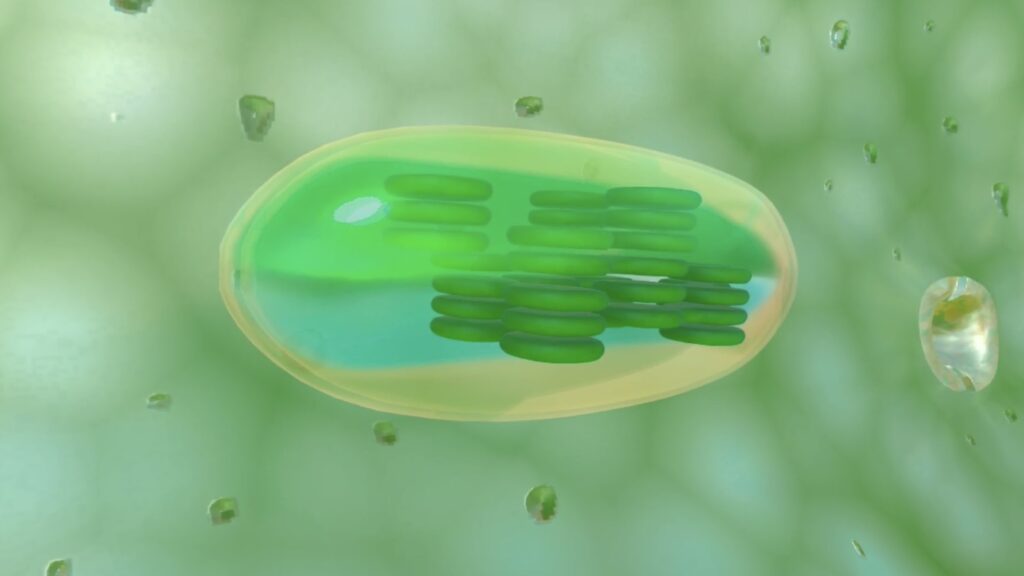
Organelles in Action: From chloroplasts and vacuoles to the nucleus, each structure can be examined up close.
Critical Malfunctions: See firsthand how organelle breakdowns affect overall cell health.
Curriculum Alignment
The plant cell Cambridge curriculum, plant cell IB, plant cell National curriculum in England, plant cell Indian curriculum CBSE, plant cell National curriculum of the Netherlands, plant cell Scuola secondaria in Italia, and plant cell Next-Generation Science Standards are all accounted for. By adapting to these varied frameworks, the XReady Lab simulation appeals to classrooms around the globe.
An Engaging Lesson Scenario
Pair up your students and have each team navigate the plant cell vr tour together. Encourage them to note similarities and differences in organelles (especially if you pair it with the animal cell module). After the simulation, host a group discussion about how structures like chloroplasts distinguish plant cells from animal cells, prompting critical thinking and collaborative learning.
Diving into the VR Animal Cell: Understanding Life at a Cellular Level
Animal Cell VR Tour
Like the plant cell, the vr animal cell module expands student insights into mitochondria, the nucleus, the Golgi apparatus, and more. Immersing them in a 3D environment clarifies the role of each organelle in maintaining cellular health.
Curriculum Integration
From the animal cell Cambridge curriculum to animal cell IB, animal cell National curriculum in England, animal cell Indian curriculum CBSE, animal cell National curriculum of the Netherlands, and animal cell Scuola secondaria in Italia, XReady Lab’s simulation covers all major standards. Educators can easily incorporate these experiences into regular lessons or advanced studies.
Encouraging Team-Based Exploration
While one student navigates the animal cell vr tour, the other can take notes on differences from the plant cell. Later, they can swap roles. This hands-on, two-way immersion fosters collaboration and keeps students engaged. Finally, let them compare how various curriculums approach animal cells, reinforcing both knowledge retention and curiosity.
How a VR Cell Simulation Transforms Class Time
Active, Interactive Classroom
Traditional lessons often leave students passively observing. VR solutions for schools convert that passivity into engagement—interactive classroom activities that keep learners motivated.
Fewer Setup Hassles
A digital classroom focusing on VR education means fewer lab materials, no messy chemicals, and less time spent prepping. Educators can invest their energy in technology in education that fosters higher-level thinking.
Cross-Curricular Benefits VR biology is only the start. Schools can explore VR physics or VR chemistry for a well-rounded STEM lab approach, bridging multiple disciplines in one immersive environment.
Career Inspiration
Young minds exposed to vr cell experiences may spark an interest in biology, medicine, or biotechnology, fueling a lifelong passion.
Request a Free Demo: Dive into the VR Cell Today
Ready to transform your STEM lab? Try out XReady Lab’s VR plant cell or animal cell vr tour on Meta Quest or Pico to see exactly how virtual reality learning can revolutionize the way students perceive cell structure and function.
Experience how an interactive classroom environment, powered by VR education, can elevate lessons from passive to participatory. Let your students step inside a cell, manipulate organelles, and develop a deep, intuitive grasp of biology.
Unlocking the Future of Learning
In a world where many academic subjects remain theoretical and intangible, vr inside the cell experiences stand out for their ability to turn abstract concepts into tangible adventures. By combining VR in schools with a forward-thinking approach, teachers can bridge gaps in understanding, re-energize STEM interest, and set a new standard for what a digital classroom can achieve.
Explore XReady Lab’s commitment to VR for education and watch how quickly your students adopt a love for biology. From comparative lessons on plant and animal cells to advanced discussions on organelle functions, vr cell structure simulations open doors to deeper learning, higher engagement, and a modern vision of scientific exploration.
Brief Q/A:
What is a VR cell simulation in biology education?
A VR cell simulation is an immersive 3D learning experience that allows students to explore plant and animal cells from the inside. Instead of flat diagrams, learners can interact with organelles, observe their functions, and understand how cellular systems work together in real time.
Are VR cell simulations aligned with school curricula?
Yes. VR cell simulations from XReady Lab are aligned with major international curricula, including Cambridge, IB, CBSE, National Curriculum for England, NGSS, and European national standards. This allows teachers to integrate VR seamlessly into existing lesson plans.
Is VR effective for biology learning in middle and high school?
Research and classroom practice show that VR increases student engagement, motivation, and comprehension in biology. Interactive experiences activate multiple learning channels, making abstract topics like cell structure easier to grasp for middle and high school students.
What equipment is needed to use VR cell simulations in schools?
Most VR cell simulations run on standalone headsets such as Meta Quest or Pico. No laboratory materials or complex setup is required, making VR an accessible option for modern classrooms.
How large is the library of XReady Lab content in VR, Web, and PC formats?
XReady Lab offers the largest K–12 STEM VR and Web/PC library with an AI Tutor. The packages include biology, physics, chemistry, and math, covering topics from primary school through high school.
All content is designed to align with major curricula and deliver engaging, interactive learning experiences. New simulations are added monthly.
Which curriculum alignment do you have?
XReady Lab’s simulations are aligned with IB, Cambridge IGCSE, AS & A Levels, NGSS, College Board, Common Core, TEKS, CBSE, BNCC, the National Curriculum for England, the Italian secondary school curriculum (Scuola Secondaria), and the National Curriculum of the Netherlands (VMBO, HAVO, VWO).
What are Career Packs, and which careers do they cover?
Career Packs are VR simulation bundles that let students explore STEM careers in practice. Current packs include: Future Doctor, Future Nurse, Future Engineer, Future HVAC Engineer, Future Biotechnologist, Future Astronomer, Future Neuroscientist.
New Career Packs are added regularly.
What makes XReady Lab’s AI Tutor different from other AI tutors and AI tools?
XReady Lab Superhuman AI Tutor works like a real tutor, guiding students step by step instead of giving ready-made answers. It focuses on reasoning, problem-solving, and explaining mistakes to build real understanding.
Created by international STEM Olympiad winners and coaches, it helps prepare for exams, increases memory retention by 40%, and works in real time in both VR and desktop formats with an internet connection.
What are Lesson Plans, Engagement Playbooks, and classroom scenarios?
XReady Lab packages include complimentary teacher training and ready-to-use Lesson Plans and Engagement Playbooks to support engaging lessons.
They guide teachers in integrating VR/web/PC simulations with clear objectives, step-by-step instructions, classroom management strategies, reflection activities, assessments, and technical checklists — helping teachers run effective lessons beyond the simulations themselves.
How to try XReady Lab for free?
Simply fill out the free demo form here to get access to demo XReady Lab simulations.
How do we plan and purchase a VR classroom?
We start with consultation: our team helps plan the VR classroom for your school. You need internet access and a suitable room — allocate about 5 x 5 feet (1.5 x 1.5 m) per student. One headset per two students works well.
Devices and licenses: schools can use existing Meta Quest or Pico devices and purchase licenses, or we can offer discounted devices or a turnkey solution with pre-installed content.
What happens after purchasing a VR classroom?
After purchase, we guide device setup and content installation and provide teacher training.
Teachers learn how to run VR lessons using Lesson Plans and Engagement Playbooks, manage screen casting and paired learning, and keep students engaged.
Ongoing support is always available.
What technical requirements and internet access are needed?
For Desktop or Tablet: Simulations run directly from the personal account and work without internet. If you want the AI Tutor in real time, a stable internet connection is required.
For VR headsets (Meta Quest or Pico): Internet is needed only to activate licenses. After activation, simulations work autonomously offline. To use the AI Tutor in real time, internet is required. Make sure your room has power outlets to recharge devices.
VR lessons: duration, class size, screen casting and teacher tools?
VR lessons typically last 5–15 minutes, depending on the simulation, with a recommended class size of up to 20 students. Screen casting is supported and compatible with selected teacher management systems, allowing teachers to launch simulations remotely, monitor progress, and view all devices during lessons.
Teachers are supported with Lesson Plans and Engagement Playbooks that include learning objectives, step-by-step lesson flow, classroom scenarios, reflection questions, practical assignments, and assessment guidance.
In which countries and languages is XReady Lab offered?
XReady Lab is available worldwide and supports 75+ languages. Today, it is used by 800+ schools and 150,000+ students across the globe.
What licensing and pricing options are available?
XReady Lab simulations are offered through flexible licensing packages, depending on the format and subjects you need:
VR simulation packages with AI Tutor: simulations are sold in subject-based bundles with an annual license per device. VR Biology + Physics + Chemistry: $975 per year per device.
Web version with AI Tutor for home or classroom use without VR headsets: $9.99 per month per user.
If you already have VR headsets, you only purchase licenses. If not, we can also help you choose the most cost-effective setup and licensing model for your school or family.
Which VR headsets are supported?
XReady Lab works with the most widely used standalone VR headsets in schools:
Meta Quest: Quest 2, Quest Pro, Quest 3, Quest 3S
PICO: Neo 3, Neo 3 Pro, Neo 4, Neo 4 Enterprise
All supported devices are standalone (no PC required), making them easy to deploy and manage in a school environment.
Does XReady Lab allow third-party VR content?
Yes. XReady Lab supports open ecosystems, not closed platforms. Schools can freely use third-party VR content alongside XReady Lab on Meta Quest and PICO headsets.
We encourage schools to diversify their VR classrooms with high-quality educational apps and can recommend tested solutions, helping expand learning beyond STEM into subjects like design, history, environmental studies, and soft skills.
What are the safety guidelines for VR?
XReady Lab follows school VR safety best practices. VR is recommended for students 10–12+, with short 5–15 minute sessions and seated or safe-zone use under teacher supervision, supported by screen casting.
First-time users adapt gradually. Students with medical conditions require parental and school approval, and hygiene is ensured through regular headset cleaning and replaceable face covers.
For families: What home-use options are available?
Families can access XReady Lab simulations at home in two ways:
Web version:Here, families can use simulations on computers or tablets with a subscription—no VR headset required.
VR home use: To get started, fill out the form and select the role “Parent” to receive a free demo. Our team will then contact you to discuss access and purchase options.