


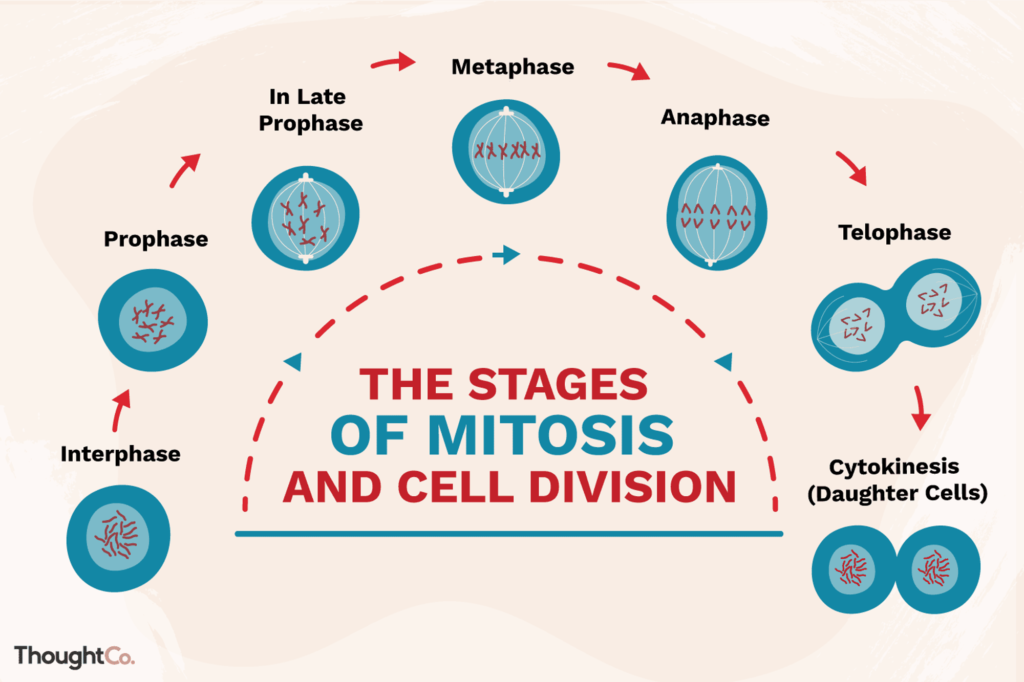
Mitosis stands as one of the most intricate and challenging topics in high school biology curricula. This complexity stems from two primary factors:
The process of mitosis is a cornerstone of biology education, essential for understanding cell division, growth, and reproduction. However, its complexity often leaves students struggling to fully comprehend and retain the information.
Typically, biology teachers rely on static images or microscope slides to illustrate the stages of mitosis. However, this method has significant drawbacks:
Experienced educators consistently report that students face considerable difficulties mastering this crucial biological concept using conventional teaching methods. This is where innovative vr education apps and vr education software can make a significant difference.
As a leading VR education company, XReady Lab has developed a groundbreaking VR Mitosis simulation that transforms this challenging topic into an engaging, interactive experience. Our VR education services leverage cutting-edge technology to create immersive learning environments that address the question: “How can VR be used in education?”
Here’s how VR is used in education to enhance the learning of mitosis:
Active Participation Instead of passively viewing static images, students become active participants in the mitotic process. They perform key actions such as replicating DNA, forming the mitotic spindle, aligning chromosomes, etc.
This hands-on approach turns a theoretical concept into a practical lesson, addressing the need for secondary school experiment ideas that engage students more effectively.
Motor Memory Enhancement Our simulation leverages motor memory to reinforce learning. Rather than simple clicks, students perform actions that mimic actual cellular processes. For example:
This approach creates a stronger connection between the concept and the physical action, aiding in long-term retention and providing practical reasons for learners to participate in the lesson.
Safe Experimentation and Exploration VR provides a safe environment for students to conduct a school experiment without the risks or limitations of a physical lab. As they progress through each stage, students receive a checklist of upcoming events, encouraging independent exploration of cellular structures.
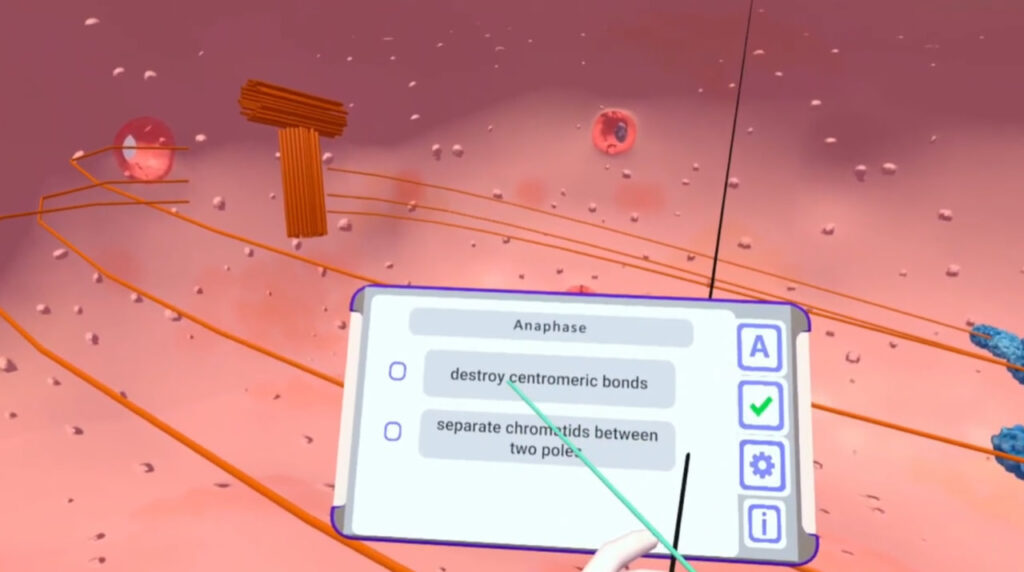
This checklist serves as a science lesson plan template, guiding students through the process while allowing for self-paced learning.
Personalized Learning Experience Each student independently performs all events within the simulation. This personal involvement allows them to recount the process in their own words: “I doubled the DNA.” “I broke down the nuclear envelope.” “I moved the chromosomes to the center.”
This first-person narrative reinforces understanding and helps students internalize the complex sequence of mitotic events, transforming a theoretical science lesson plan into an immersive, memorable experience.
XReady Lab’s VR Mitosis simulation offers numerous advantages over traditional teaching methods:
Incorporating XReady Lab’s VR Mitosis simulation into your science lesson plan is straightforward and can significantly enhance your teaching effectiveness. Here’s how you can integrate this tool into your biology curriculum:
Early adopters of XReady Lab’s VR Mitosis simulation report significant improvements in student engagement and comprehension. Teachers observe:
These improvements demonstrate the power of VR education games in transforming abstract concepts into engaging, memorable learning experiences.
While our Mitosis simulation is a flagship product, XReady Lab is committed to developing a comprehensive suite of vr education apps for biology and other sciences. Other simulations include:
By expanding our offerings, we aim to revolutionize how students engage with complex biological concepts across the curriculum.
We invite you to explore the future of science education with XReady Lab’s VR Mitosis simulation. Visit our demo request page to access our free VR education apps and discover how they can revolutionize the way your students learn biology.
Don’t just explain mitosis — let your students experience it firsthand. With XReady Lab’s VR simulations, you’re not just teaching biology; you’re inspiring the next generation of scientists, researchers, and innovators.
As we continue to push the boundaries of educational technology, VR stands out as a transformative tool for teaching complex scientific concepts. XReady Lab’s VR Mitosis simulation is just the beginning of a new era in biology education – one where students don’t just learn about cellular processes, but experience them firsthand.
By incorporating our VR simulations into your curriculum, you’re not only enhancing your science lesson plans but also equipping your students with the skills and understanding they need to excel in an increasingly technological world.
Don’t let your students miss out on this revolutionary learning experience. Embrace the future of biology education with XReady Lab’s VR simulations and watch as your students’ understanding and enthusiasm for science soar to new heights.
Frequently Asked
XReady Lab offers the largest K–12 STEM VR and Web/PC library with an AI Tutor. The packages include biology, physics, chemistry, and math, covering topics from primary school through high school.
All content is designed to align with major curricula and deliver engaging, interactive learning experiences. New simulations are added monthly.
XReady Lab’s simulations are aligned with IB, Cambridge IGCSE, AS & A Levels, NGSS, College Board, Common Core, TEKS, CBSE, BNCC, the National Curriculum for England, the Italian secondary school curriculum (Scuola Secondaria), and the National Curriculum of the Netherlands (VMBO, HAVO, VWO).
Career Packs are VR simulation bundles that let students explore STEM careers in practice. Current packs include: Future Doctor, Future Nurse, Future Engineer, Future HVAC Engineer, Future Biotechnologist, Future Astronomer, Future Neuroscientist.
New Career Packs are added regularly.
XReady Lab Superhuman AI Tutor works like a real tutor, guiding students step by step instead of giving ready-made answers. It focuses on reasoning, problem-solving, and explaining mistakes to build real understanding.
Created by international STEM Olympiad winners and coaches, it helps prepare for exams, increases memory retention by 40%, and works in real time in both VR and desktop formats with an internet connection.
XReady Lab packages include complimentary teacher training and ready-to-use Lesson Plans and Engagement Playbooks to support engaging lessons.
They guide teachers in integrating VR/web/PC simulations with clear objectives, step-by-step instructions, classroom management strategies, reflection activities, assessments, and technical checklists — helping teachers run effective lessons beyond the simulations themselves.
Simply fill out the free demo form here to get access to demo XReady Lab simulations.
We start with consultation: our team helps plan the VR classroom for your school. You need internet access and a suitable room — allocate about 5 x 5 feet (1.5 x 1.5 m) per student. One headset per two students works well.
Devices and licenses: schools can use existing Meta Quest or Pico devices and purchase licenses, or we can offer discounted devices or a turnkey solution with pre-installed content.
After purchase, we guide device setup and content installation and provide teacher training.
Teachers learn how to run VR lessons using Lesson Plans and Engagement Playbooks, manage screen casting and paired learning, and keep students engaged.
Ongoing support is always available.
VR lessons typically last 5–15 minutes, depending on the simulation, with a recommended class size of up to 20 students. Screen casting is supported and compatible with selected teacher management systems, allowing teachers to launch simulations remotely, monitor progress, and view all devices during lessons.
Teachers are supported with Lesson Plans and Engagement Playbooks that include learning objectives, step-by-step lesson flow, classroom scenarios, reflection questions, practical assignments, and assessment guidance.
XReady Lab is available worldwide and supports 75+ languages. Today, it is used by 800+ schools and 150,000+ students across the globe.
XReady Lab simulations are offered through flexible licensing packages, depending on the format and subjects you need:
If you already have VR headsets, you only purchase licenses. If not, we can also help you choose the most cost-effective setup and licensing model for your school or family.
XReady Lab works with the most widely used standalone VR headsets in schools:
All supported devices are standalone (no PC required), making them easy to deploy and manage in a school environment.
Yes. XReady Lab supports open ecosystems, not closed platforms. Schools can freely use third-party VR content alongside XReady Lab on Meta Quest and PICO headsets.
We encourage schools to diversify their VR classrooms with high-quality educational apps and can recommend tested solutions, helping expand learning beyond STEM into subjects like design, history, environmental studies, and soft skills.
XReady Lab follows school VR safety best practices. VR is recommended for students 10–12+, with short 5–15 minute sessions and seated or safe-zone use under teacher supervision, supported by screen casting.
First-time users adapt gradually. Students with medical conditions require parental and school approval, and hygiene is ensured through regular headset cleaning and replaceable face covers.
Families can access XReady Lab simulations at home in two ways:
